MPC DOOM
An SD-card DOOM port for the MPC Sample with pad controls, DATA-knob turning and a pad-LED health bar. Returns to the sampler when you quit.
Screenshots (3)
Images: from jeffwebb-to/mpc-sample-doom
About

DOOM on the Akai MPC Sample, from an SD card.
 Boot splash, drawn while the WAD loads |
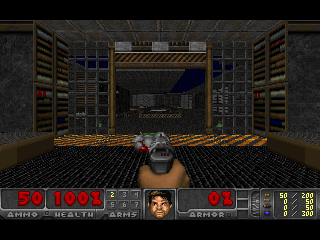 E1M1 on the 320x240 panel |
The card's autorun script stops the sampler application, runs a statically linked DOOM binary from RAM and starts the sampler again when DOOM exits. The pads move and shoot, the DATA knob turns, the pad LEDs show a health bar. Remove the card and power cycle and the device is exactly as it was.
Tested on firmware 1.3.0.12. Sound effects are implemented and work in the emulator but are not yet confirmed on hardware. There is no music.
Contents
- Quick start
- Risk and data protection
- Controls
- Installing
- Troubleshooting
- Building from source
- How it works
- Developing with the emulator
- Design rules
- Credits
- Licence
Quick start
- Read Risk and data protection and do the backups it describes.
- Download
doom-autorun.zipfrom the latest release and unzip it. - Copy the
autorunfolder and thedoomfolder to the root of an SD card. A fresh card is best. - Save the project that is open on the MPC Sample, then insert the card. DOOM starts a few seconds after the sampler has booted.
- Hold SHIFT and press STOP to quit. The sampler comes back. Remove the card for a normal boot.
The zip is built by build.sh from this repository. It contains the binary, the autorun
script, Freedoom and a plain-text copy of these instructions. Nothing needs to be compiled or
installed on a computer.
Risk and data protection
This is an unofficial modification. It is designed so that it cannot alter the device's firmware or internal storage, but there is no publicly verified procedure for recovering an MPC Sample that fails to boot, so you use it at your own risk. The realistic risks are to your data, not to the hardware, and they are easy to remove:
- Save the project that is open on the MPC Sample before you insert the card. Starting DOOM shuts the sampler application down the same way a normal shutdown does. The application keeps its temporary project across that, but unsaved edits should never depend on it.
- Use a fresh SD card, or back up the card you are going to use. Copy everything on the
card to a computer first. The script only reads from the card's
doomfolder and never writes to the card, but if something goes wrong you want a copy. A spare card with only the DOOM files on it is the simplest option. - Back up the projects and samples you keep on the device. Use the sampler's own export or copy them off over USB. Do this before trying any modification, not just this one.
- Copying the
autorunfolder replaces any autorun folder already on the card. If the card has an autorun package from something else, keep a copy of it.
Save your project. Back up your card. Back up your device. Then play.
Controls
| Control | DOOM |
|---|---|
| PAD 1 / 2 / 3 / 4 (bottom row, PAD 1 is bottom left) | strafe left / walk back / walk forward / strafe right |
| PAD 5 / 6 / 7 / 8 | fire / use / run (hold) / next weapon |
| PAD 9 to 16 | health bar on the LEDs (green above 66 %, yellow above 33 %, otherwise red) |
| DATA knob | turn, about 9 degrees per detent. In a menu it moves the cursor |
| DATA push | Enter |
| SHIFT | Esc (opens the menu, goes back) |
| PLUS / MINUS | menu down / up |
| PLAY / STOP | Yes / No when the game asks a question |
| TAP TEMPO | automap |
| SHIFT held, then STOP | quit DOOM and return to the sampler |
Pads 1 to 8 are lit in a colour for their function: blue for movement, red for fire, green
for use, yellow for run and purple for weapon. The mapping is in src/doomgeneric_mpc.c in
the pad_key and button_key tables. PLUS, MINUS and the weapon keys use private key codes
(0xB0 to 0xB3) that DG_Init binds to the engine's key_menu_up, key_menu_down,
key_nextweapon and key_prevweapon variables so they cannot collide with movement keys.
Installing
Do the backups in Risk and data protection first.
Get
doom-autorun.zipfrom the latest release, or build it (see Building from source), and unzip it.Copy the
autorunfolder and thedoomfolder to the root of the SD card, so the card contains:autorun/autorun.json autorun/doom.sh autorun/autorun.check autorun/doom doom/freedoom1.wad doom/FREEDOOM-COPYING.txtThe script never writes to the card and never reads anything outside those two folders.
Optional. If you own DOOM, put your
doom.wadordoom2.wadin the card'sdoomfolder. The script uses the first ofdoom.wad,doom2.wad,doom1.wad,freedoom1.wadandfreedoom2.wadthat it finds. Upper-case names such asDOOM.WADare accepted for the first three; other spellings are not.Save the project that is open on the MPC Sample.
Insert the card. DOOM starts a few seconds after the sampler has finished booting, and it starts at every power-on while the card is in. Remove the card for a normal boot.
Quit with SHIFT then STOP, or from the game's menu. The sampler application restarts and reloads its project.
Troubleshooting
| Symptom | What to do |
|---|---|
| Nothing happens after inserting the card | Check that autorun and doom are at the root of the card, not inside another folder, and that all four files are in autorun. The device only runs the script if autorun.check matches the other two files, so do not edit autorun.json or doom.sh without rebuilding; build.sh regenerates the check file. |
| Black screen, DOOM does not appear | Wait ten seconds. If the sampler does not come back on its own, remove the card and power cycle. The device boots normally without the card. |
| DOOM freezes | Remove the card and power cycle. The sampler was stopped cleanly before DOOM started, so this is no worse than a normal power-off. |
| The sampler does not come back after quitting | Power cycle with the card out. |
| Sound is loud | DOOM plays at whatever output level the sampler left. Turn the volume down before starting, in particular with headphones. |
| No sound | The speaker is switched on automatically if it was off and no headphones are plugged in; headphones take priority. Sound is not yet confirmed on hardware (see the status at the top). |
| Saved games are gone | They are kept in RAM and lost at power-off. The program never writes to the card or the device. |
| A different firmware version | Untested. The script checks that it is root and that /run is a RAM filesystem before it stops the sampler, and restarts the sampler if DOOM fails to start, but another version could differ in ways not covered here. |
Building from source
Requirements:
- Docker, with the
mpclab-toolsimage from virtual-mpc-sample. Runningpython3 lab.py buildin that repository creates it. It is a Debian image withaarch64-linux-gnu-gcc. Any aarch64 glibc cross compiler works if you edit thedocker runline inbuild.sh. curl,unzip,zipandpython3on the host.
./build.sh
This writes build/doom (static aarch64, about 1.4 MB), downloads Freedoom 0.13.0 into
wads/ if it is not already there, and assembles dist/doom-autorun.zip.
The engine is compiled unmodified. build.sh takes every .c file in
doomgeneric/doomgeneric/ except the other platform back ends and the SDL and Allegro sound
modules, and builds them with -DDOOMGENERIC_RESX=320 -DDOOMGENERIC_RESY=200, so the frame
is the game's native 320x200 letterboxed on the 320x240 panel, and -DFEATURE_SOUND, which
makes the engine's i_sound.c use the sound and music modules from i_mpcsound.c. The
empty src/SDL_mixer.h and the variables use_libsamplerate and libsamplerate_scale
defined in i_mpcsound.c are what i_sound.c needs to compile without SDL. The warnings
printed during the build come from the engine.
autorun.check is the SHA-256 of autorun.json, then doom.sh, then the salt
f7bed1c9-7e90-4731-9194-c996666b4331, written as hex. The firmware refuses to run the
script if it does not match.
Repository layout
autorun/        autorun.json and doom.sh, the SD card script. autorun.check is generated by build.sh
src/            doomgeneric_mpc.c  screen, pads, buttons, knob, LEDs, timing, splash
                i_mpcsound.c      sound effects: DMX lumps, a mixer, raw ALSA PCM; music stub
                drm_uapi.h        DRM structs and ioctl numbers declared by hand (the cross
                                  compiler image has no DRM headers)
                SDL_mixer.h       empty header so the engine's i_sound.c compiles with FEATURE_SOUND
                splash.h          the boot splash text as a 1-bit bitmap, generated by tools/mksplash.py
tools/          mksplash.py renders the splash text (needs Pillow); mklogo.py writes docs/logo.svg
doomgeneric/    copy of https://github.com/ozkl/doomgeneric (GPL-2.0), unmodified
wads/           Freedoom, downloaded by build.sh (not committed)
docs/           logo and screenshots
build.sh        cross-compiles the binary and packages dist/doom-autorun.zip
lab-run.sh      copies a build into the emulator and runs it
READ ME.txt     instructions for players, included in the zip
How it works
The MPC Sample is a Rockchip RK3566 running a Yocto Linux with a 6.12 PREEMPT_RT kernel,
systemd, BusyBox and glibc. The sampler is a single program, /usr/bin/MPC Sample, run as
ac50.service. The stock firmware runs autorun/<script> from an inserted SD card as root
at every power-on if autorun.json names it and autorun.check matches. With
askQuestion set to false in the JSON it runs without a prompt.
The script (autorun/doom.sh) checks that it is root and that /run is a tmpfs, picks
the WAD from the card's doom folder, copies the binary to /run/doom (the card is mounted
noexec, so it cannot be run in place) and exits if a copy of DOOM is already running. It
then stops ac50.service with systemctl stop, which lets the sampler shut down the way it
does at power-off, and runs DOOM with the WAD read directly from the card. A trap starts
ac50.service again when DOOM exits, whether it quit normally, crashed or was killed. Its
log is /run/doom.log.
Screen. The program opens /dev/dri/card0 and takes DRM master. This fails with EBUSY
if another process holds it, for example the sampler or an earlier copy of DOOM. It selects
the connector's 320x240 mode, creates one XRGB8888 dumb buffer, registers it as a framebuffer
and sets it on the CRTC. The game thread copies each new frame into a buffer in RAM. A
separate flush thread copies that into the dumb buffer and issues DIRTYFB for the 320x200
game rectangle. The panel is an SPI display driven by mipi-dbi, so it only updates on
DIRTYFB, and a full frame takes about 50 ms on the hardware, which is why the game thread
never flushes itself. If a new frame arrives while a flush is in progress it replaces the
one that is waiting, so there is never more than one frame of lag. Frames identical to the
previous one are skipped. The letterbox bars are flushed once at startup.
Splash. As soon as the program owns the panel it draws a title card and keeps it up for
at least 2.5 seconds, which covers the time the engine spends loading the WAD. The text is
a 1-bit bitmap in src/splash.h. To change it, edit the lines at the top of
tools/mksplash.py and run it. It uses Pillow's built-in font, so the output does not
depend on the fonts installed on the machine. MPCDOOM_SPLASH_MS overrides the minimum
time.
Input. The pads, buttons and knobs arrive over ALSA raw MIDI on /dev/snd/midiC<n>D0,
the card whose id is Surface. After opening it the program calls
SNDRV_RAWMIDI_IOCTL_PARAMS with mode set to 0. The sampler leaves the device in
timestamp framing mode, and without this call reads return 32-byte
snd_rawmidi_framing_tstamp structures instead of MIDI bytes. A reader thread parses the
stream into a lock-free queue of key events. Pads are notes on channel 10, buttons are notes
on channel 1, and the DATA encoder is CC 100 with a relative value. The encoder movement
becomes a mouse event once per tic, so turning speed follows the knob, or menu up and down
presses while a menu is open.
LEDs. Pad colours are set with the SysEx message F0 47 7F 5C 65 00 04 <pad> <R> <G> <B> F7 written to the same MIDI file descriptor. Only pads whose colour changed are sent,
and all pads are switched off on exit.
Sound. src/i_mpcsound.c opens the sound card that /dev/snd/by-path/platform-sound
points at and uses the raw ALSA ioctls directly, without alsa-lib. The hardware parameters
are S32_LE at 44.1 kHz, 256-frame periods, 4 periods in the buffer, 2 channels with a
fallback to 4 if 2 is rejected (the extra channels are silent). An audio thread running at
SCHED_FIFO mixes up to 16 voices. Each DMX sound lump is converted to 16-bit on first use,
resampled with linear interpolation and panned with DOOM's sep and vol values. The
thread writes one period at a time and re-prepares the device after an underrun. The stream
is kept open for the whole run because the DAC takes about a second to unmute after the
stream starts. If the speaker switch is off and no headphones are detected, the speaker is
switched on and restored to off on exit. MPCDOOM_DEBUG=1 logs the output peak level every
5 seconds. The music module is a stub.
Exit. SHIFT then STOP, or SIGTERM, SIGINT or SIGHUP, makes the game thread call
I_Quit(). atexit handlers switch the LEDs off, blank the screen and drop DRM master so
the sampler can take the display when it restarts.
Developing with the emulator
virtual-mpc-sample boots the stock
firmware in QEMU with the panel in a browser and is the safe place to test changes.
lab-run.sh expects that repository checked out next to this one; set LAB_DIR if it is
elsewhere. Differences from the hardware that matter here: the emulated connector lists many
modes rather than one, its loopback sound card accepts 4 channels only, there are no
speaker or headphone switches, and panel flushes are instant, so frame rates in the emulator
say nothing about the device.
(cd ../virtual-mpc-sample && python3 lab.py run)   # wait for "Multi-User System" in out/run/console.log
./lab-run.sh                       # copy the binary and a WAD to /run/doom, stop ac50, run DOOM
./lab-run.sh --log                 # DOOM's output; an fps line every 5 seconds
MPCDOOM_DEBUG=1 ./lab-run.sh       # also log every control-surface byte and key event
./lab-run.sh --stop                # SIGTERM, a clean quit; the sampler comes back
python3 scripts/qmp.py screendump out.png                       # in virtual-mpc-sample: grab the DRM output
curl -X POST 127.0.0.1:8765/control -d '{"name":"PAD 3","action":"press","value":100}'   # then "release"
curl -X POST 127.0.0.1:8765/control -d '{"name":"DATA","action":"turn","value":2}'       # 126 means -2
python3 lab.py autorun dist/doom-autorun.zip --results           # test the card package; reboots the VM
python3 lab.py autorun dist/doom-autorun.zip --device-label      # card path with a space, as on the device
Control names are in virtual-mpc-sample/panel/controls.json. lab.py autorun waits for
the stock application to come back, so with this package it blocks until DOOM is quit inside
the guest.
Design rules
- The script and the program write only to
/runand/tmp. They never mount anything, never open/dev/mmcblk0*, and never write to the SD card. The root filesystem is protected by dm-verity and the boot chain is signed; those partitions are the only way to make the device unbootable, and nothing here goes near them. - The sampler is stopped with
systemctl stop, never killed, and no file it has open is modified. ac50.serviceis restarted on every exit path, including a crash, so the device is not left on a black screen while the card is in.- Changes are tested in the emulator before they go anywhere near a real device.
Credits
- doomgeneric by ozkl is the engine. It is GPL-2.0 and is based on Chocolate Doom and id Software's DOOM source.
- Freedoom provides the free game data under a BSD licence.
- virtual-mpc-sample and
mpc-sample-root-ssh made
development without risk to the hardware possible and documented the
autorun.checkformula. - mpc-sample-lab documents the control surface protocol and the audio and display hardware.
Licence
GPL-2.0, see LICENSE. The engine is doomgeneric, which is GPL-2.0, and the code
in src/, autorun/, tools/ and the scripts is released under the same licence. Freedoom
is BSD licensed; its FREEDOOM-COPYING.txt is in the zip. Do not commit commercial WADs.
DOOM is a trademark of id Software. Akai and MPC are trademarks of inMusic Brands. This
project is not affiliated with either company.
Recent releases
-
Release notes
First release. Tested on an MPC Sample with firmware 1.3.0.12.
Before installing: save the project that is open on the MPC Sample, use a fresh SD card or copy your card to a computer first, and back up the projects and samples on the device. Full details and the failure cases are in the README.
Install: unzip
doom-autorun.zip, copy theautorunfolder and thedoomfolder to the root of the SD card, save your project, insert the card. DOOM starts a few seconds after the sampler has booted. Hold SHIFT and press STOP to quit. Remove the card for a normal boot.Contents of the zip: the static DOOM binary and autorun script, Freedoom 0.13.0 game data (BSD licence), and
READ ME.txt. Put your owndoom.wadordoom2.wadin thedoomfolder to play the original levels.Known limits: no music; sound effects work in the emulator but are not yet confirmed on hardware; saved games are kept in RAM and lost at power-off.
SHA-256 of
doom-autorun.zip:323c1d70a883670692fb43c36cc2dc0afd06ec941d4b9080f7dffa7bf24bbdd4