MPC Sample 图文教程
A Chinese illustrated hip-hop-style handbook for the Akai MPC Sample (AC50), covering functions, drums, sampling and controls, published as a GitHub Pages site.
Images: from dalin1254428907-lang/mpc-sample-tutorial
About
Akai Professional MPC Sample(型号 AC50,2026 年 3 月上市) 的中文图文教程,以 GitHub Pages 网站形式发布。暗色 hip-hop 风格,内容依据官方 User Guide v1.3.0 核对。
在线阅读: https://dalin1254428907-lang.github.io/mpc-sample-tutorial/(把 dalin1254428907-lang 换成你的 GitHub 用户名)
也可以直接在 github.com 上阅读 Markdown:从 index.md 开始,或进入 chapters/。
目录
| 章节 | 状态 |
|---|---|
| 第一章 功能与特点 | 已完成 |
| 第二章 打击乐音色、使用场景、写 beat | 写作中 |
| 第三章 采样、速度节奏、beat 风格 | 写作中 |
| 第四章 每个界面的每个旋钮与按键 | 写作中 |
| 第五章 术语表(英中 / 英日) | 已完成 |
发布到 GitHub Pages
本仓库是纯 Jekyll 站点,GitHub Pages 原生构建,不需要 Actions:
- 推送到 GitHub 仓库
mpc-sample-tutorial。 - 仓库 Settings → Pages → Build and deployment:Source 选 Deploy from a branch,Branch 选
main,目录/ (root)。 - 几分钟后即可访问
https://dalin1254428907-lang.github.io/mpc-sample-tutorial/。
如果仓库名不是
mpc-sample-tutorial,请修改_config.yml里的baseurl(用户站点dalin1254428907-lang.github.io则设为"")。
目录结构
_config.yml              站点配置(title / lang / baseurl)
_layouts/default.html    唯一布局:页头导航、标注图替换、翻页
_includes/
  outline.html           全书大纲(自动循环 site.pages)
  pager.html             上一章 / 下一章
  figures/*.html         内联 SVG 标注图(由 tools/build_figures.py 生成)
_data/                   标注坐标:markers / regions / legend / pads / callouts
assets/css/style.css     暗色 hip-hop 样式
assets/js/site.js        术语表切换(三语 / 英中 / 英日)、编号圆点
assets/img/              照片与官方产品图;annotated/ 为标注图位图(github.com 浏览用)
chapters/NN-*.md         各章正文
index.md                 封面
tools/build_figures.py   从 _data 生成标注图(SVG + JPG)
如何新增章节
在
chapters/新建一个 Markdown 文件,例如chapters/06-live-tips.md。文件开头写前言字段(front matter):
---
title: "第六章 现场演出技巧"
chapter: 6
nav_order: 6
short_title: "现场演出"     # 顶部导航显示的短名
status: draft              # done = 已完成,draft = 大纲 / 写作中
outline:                   # 封面“全书大纲”里列出的小节
  - "6.1 ……"
  - "6.2 ……"
---
正文用普通 Markdown 写。图片用相对路径,例如
,这样在 github.com 和网站上都能显示。完成。顶部导航、封面大纲和上一章/下一章会按
nav_order自动更新,不需要改任何其他文件(可顺手更新本 README 的目录表)。
标注图(可选)
标注点坐标在
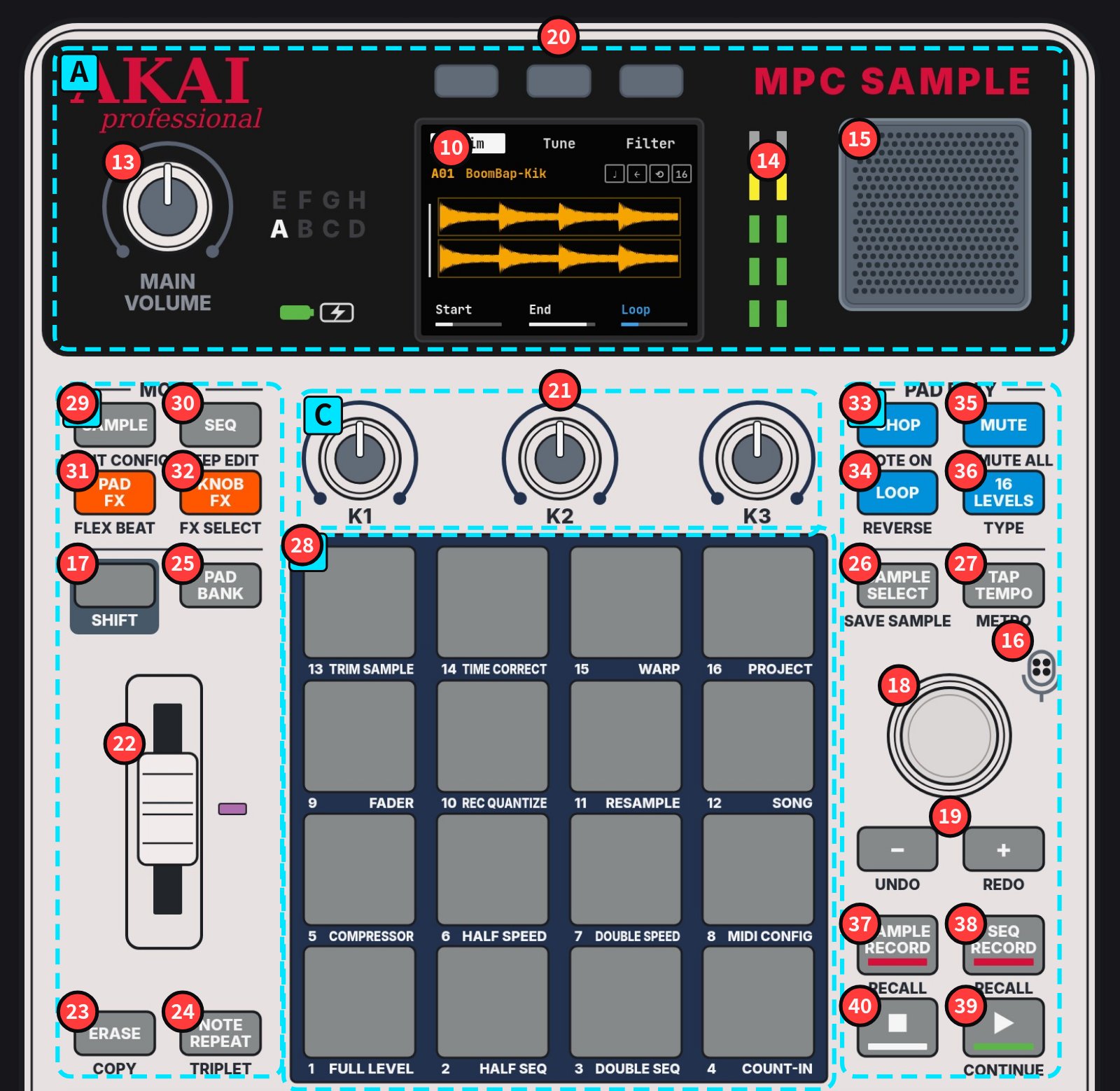
_data/*.yml,坐标系是照片assets/img/mpc-sample-top.jpg(1536×1240,即原照片裁掉顶部 200px)。修改后运行
python3 tools/build_figures.py(需要pyyaml、pillow和 Google Chrome),会同时更新_includes/figures/*.html(网站用内联 SVG)和assets/img/annotated/*.jpg(github.com 用)。在 Markdown 里插图:前言加
figures: [fig-a],正文写<!-- figure:fig-a --> <p class="gh-only"><img loading="lazy" src="../assets/img/annotated/fig-a.jpg" alt="说明"></p>网站上注释会被替换成内联 SVG,
gh-only的位图仅在 github.com 上显示。
本地预览(可选)
bundle install
bundle exec jekyll serve
# 打开 http://127.0.0.1:4000/mpc-sample-tutorial/
图片来源
- 正面照片:作者本人的机器。
- 后面板与侧面照片:Akai Professional 官方产品图(akaipro.com),版权归 Akai Professional / inMusic 所有,仅作教学说明引用。