NAM Player for Akai MPC
Neural Amp Modeler (NAM A1/A2) profile player for Akai MPC standalone hardware, built for the MPC Sample, with a web UI over USB.
Screenshots (2)
Images: from iwazowsky/mpc-nam-player
About
Play Neural Amp Modeler captures of amps, pedals and preamps as an insert effect on Akai MPC standalone hardware. Built for the MPC Sample, where it runs as a Knob FX, with a web page served by the plugin itself over the USB-C cable for everything the device has no screen for.
What it does
- Plays
.namprofiles: NAM A2 (the 2026 architecture, including the Lite and Full versions inside one file) and the older A1 WaveNet and LSTM profiles. - Browses the card with two knobs: Model and Folder, plus Drive, Mix, Tone and Level.
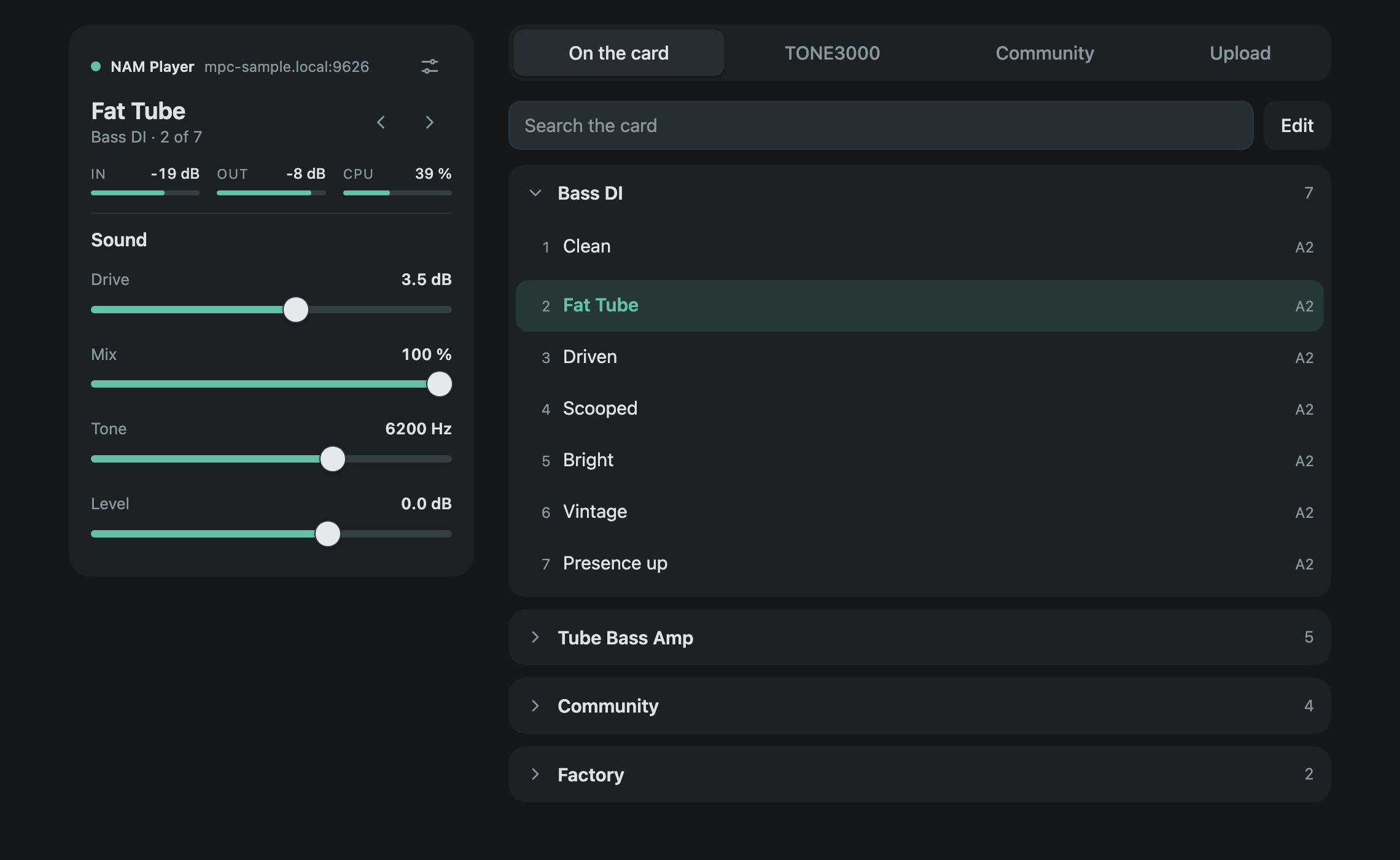
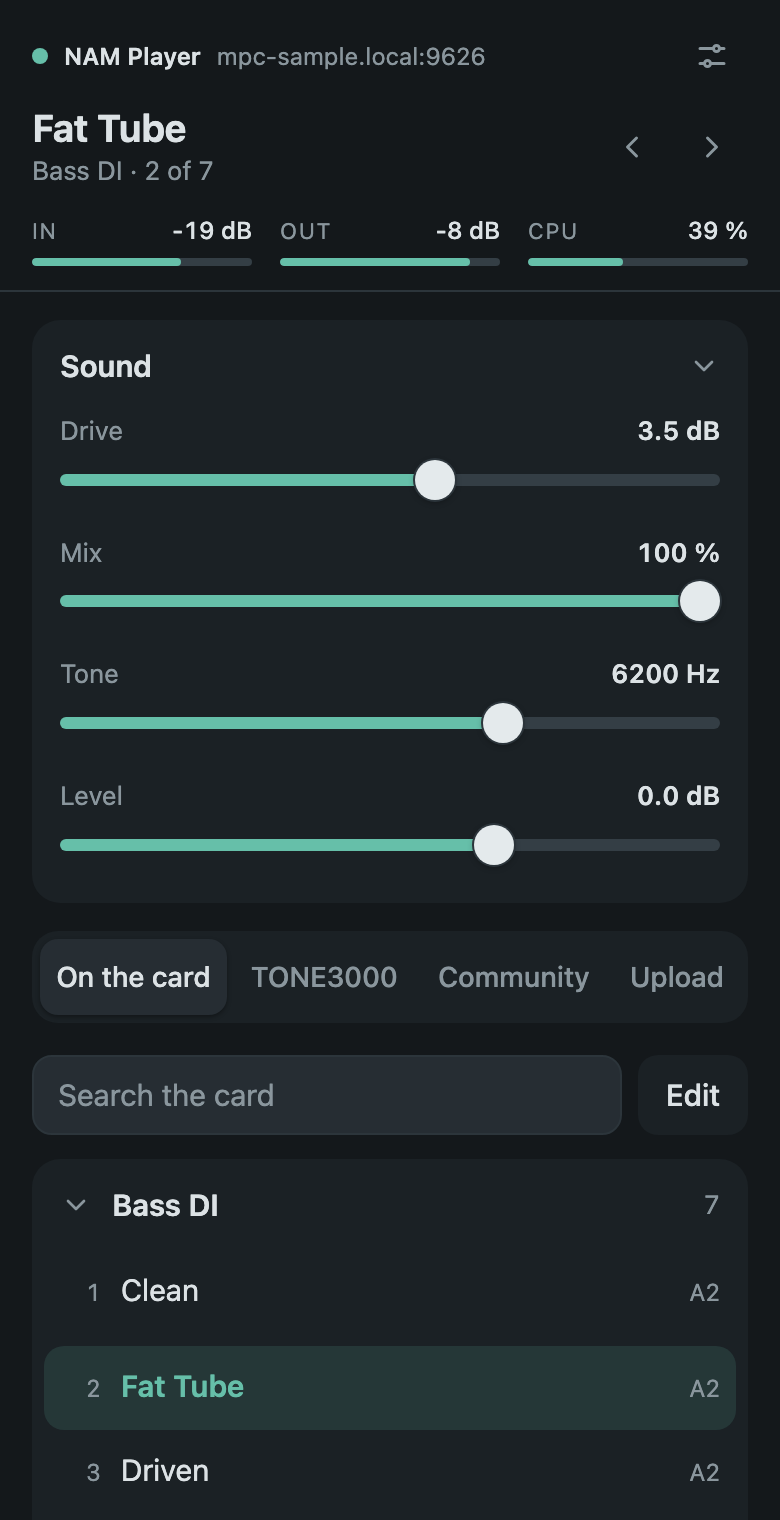
- Has a screen in your browser. While the plugin is loaded, open
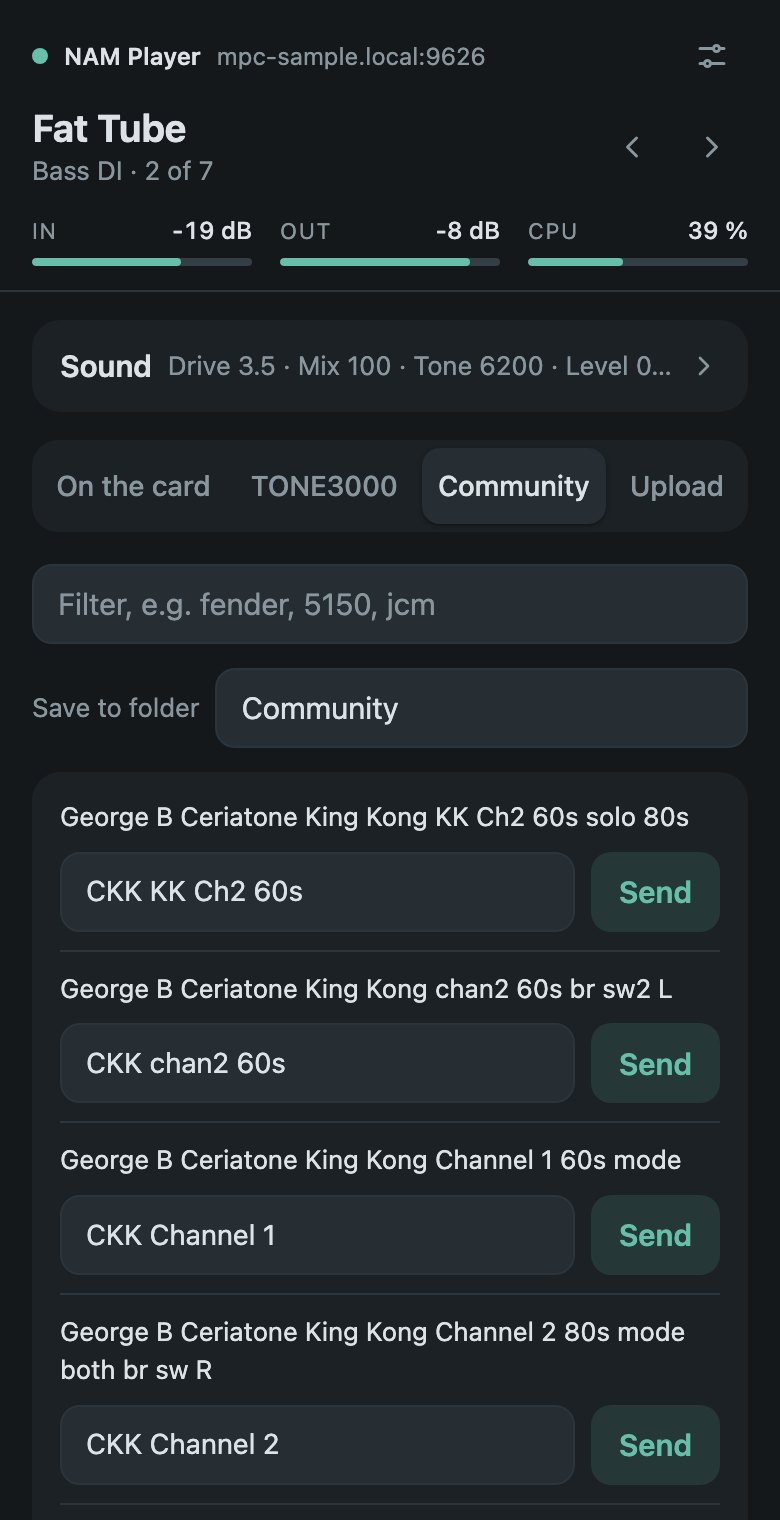
http://mpc-sample.local:9626on the computer or phone at the other end of the USB-C cable: see what is playing, switch profiles, move the controls, watch levels and CPU. - Takes new profiles while it plays. Send your own files, pick from a community collection of 259 captures, or browse TONE3000. They are saved to the card and start playing at once: no SD Card Access mode, nothing to eject.
- Sounds like the reference. Models run at their own 48 kHz through a resampler, and the output matches NeuralAmpModelerCore to better than -90 dB in the tests and on a real MPC Sample.
- Looks after the MPC. Loading happens off the audio thread with click-free switching, and a model that is too heavy for the CPU is dropped to its Lite version or bypassed.
Install
You need an MPC Sample with firmware 1.4.0 or later. (Other MPCs need MPC OS 3.10.1 or later; the plugin is built for them but has not been run on one.)
- Download the zip from the latest release and unzip it.
- On the MPC Sample: MIDI Config → Dev Enhancements (Beta) → turn on Dev Enhancements (Beta), then Custom Plug-In Support.
- Connect the MPC to a computer with USB-C and enter SD Card Access mode from the Project screen. The card appears as a drive.
- Copy the folder
Vazgen - VST - NAM Playerinto a folder namedVST2 Pluginsat the top of the card (create it if it is not there). - Eject the card on the computer, leave SD Card Access mode, and restart the MPC.
NAM Player is now at the bottom of the FX Select list.
Use it
On the MPC Sample: the knobs are Model, Drive, Mix. With SHIFT: Folder, Tone, Level. Two demo profiles ship with the plugin in a folder called Factory.
In a browser: with NAM Player loaded and the USB-C cable connected, open http://mpc-sample.local:9626 (or http://192.168.155.1:9626) on the computer or phone.
| Tab | What it is for |
|---|---|
| On the card | Every folder and profile on the card. Tap one to play it; Edit to remove |
| TONE3000 | Sign in with your publishable API key, pick a tone on TONE3000, send its models |
| Community | 259 captures from pelennor2170/NAM_models (GPL-3.0) |
| Upload | Your own .nam files, chosen or dropped anywhere on the page |
The device with the browser does the downloading, so it needs its own internet connection for TONE3000 and the community collection. The plugin never connects out to anything, and it listens only on the USB link.
Profiles live in NAM Profiles on the card, beside VST2 Plugins; each folder inside is
one position of the Folder knob. You can also copy files there by hand in SD Card Access
mode.
The plugin's README has the details: every control, the card layout, how the link works and what it will not do, and how the audio path is built.
CPU
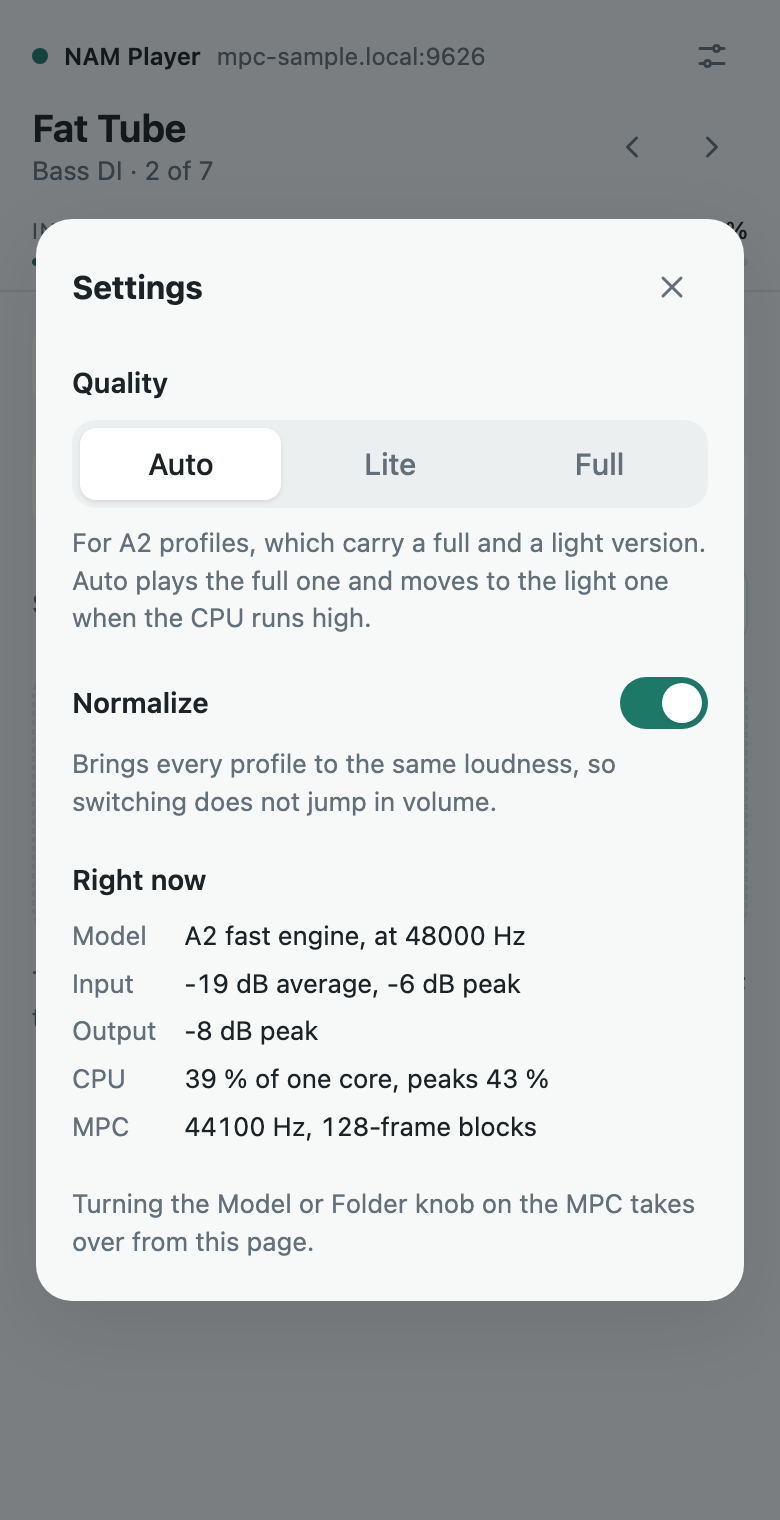
A neural amp model is much heavier than an ordinary effect. Measured on an MPC Sample (firmware 1.4.0.8): an A2 profile at full size takes about 39 % of one core, with no late blocks. A2-Lite and the small A1 sizes need less; A1 standard needs more. Prefer A2 profiles, and set Quality to Lite in the page's settings when you need headroom.
Status
Working on one MPC Sample, firmware 1.4.0.8. Things to know before you rely on it:
- TONE3000 sign-in from the page has not been run against the live service yet. It is written from TONE3000's published API. The companion below is a second route.
- Not run on any other MPC model. The 32-bit ARM build has never been executed.
- No stereo processing (the model is mono, the dry signal stays stereo), no noise gate,
no cabinet impulse loader, and no
.nambfiles.
The full list is under "Not tested, not implemented" in the plugin's README.
The companion
companion/nam_card_loader.py is a small web app for the computer the MPC is plugged
into, with no dependencies beyond Python 3. It does what the plugin's page does (TONE3000,
the community collection, your own files) and also works in SD Card Access mode, where it
writes straight to the mounted card and can install the plugin for you.
python3 companion/nam_card_loader.py # then open http://localhost:8765
Build from source
git clone https://github.com/inmusic-software/mpc-plugin-builder-sdk.git sdk    # once, into this folder
python3 build.py                  # -> plugins/NAM Player/build/Vazgen - VST - NAM Player/
python3 tests/run_tests.py        # audio against the NAM reference, latency, state, CPU guard (needs numpy, scipy)
python3 tests/test_link.py        # the live link, with audio running in real time
python3 tests/test_companion.py   # the companion against a stand-in TONE3000 and GitHub
sh tests/run_linux_arm.sh         # the real ARM64 library under Linux (Docker on an ARM64 computer)
The first build downloads the zig cross compiler into sdk/.sdk-tools/ (about 50 MB).
Use build.py here, not the SDK's own: the NAM engines need C++20 and a C compile pass.
To check on the device that the plugin does what the NAM reference does:
python3 tests/device/check_capture.py --profile <the .nam that is loaded> --record 8
while something plays through it.
build.py                wrapper around the SDK's build (C++20, third-party engines)
plugins/NAM Player/     the plugin: src/, third_party/, Content/, plugin.json, ui.json
companion/              nam_card_loader.py and the file list of the community collection
tests/                  regression tests, the ARM Linux run, the on-device check
docs/screenshots/       the pictures on this page
Credits and licences
This project's own code is MIT. It is built with Akai's
MPC Plugin Builder SDK and
contains NeuralAmpModelerCore (MIT,
Steven Atkinson), TONE3000's embedded A2 engines
(MIT), Eigen (MPL-2.0) and
nlohmann/json (MIT); see
third_party/README.md. Profiles you download
have their own licences: each source's creator and licence is written to an ABOUT.txt
beside the files.
Neural Amp Modeler is Steven Atkinson's project. This plugin is not affiliated with it, with TONE3000 or with Akai Professional. "MPC" and "Akai Professional" are trademarks of inMusic Brands, Inc.
Recent releases
-
Release notes
First public build of NAM Player for Akai MPC standalone hardware.
Install: unzip, then copy the folder
Vazgen - VST - NAM PlayerintoVST2 Pluginsat the top of your MPC's card (SD Card Access mode), eject, and restart the MPC. On the MPC Sample you need firmware 1.4.0 or later with MIDI Config → Dev Enhancements (Beta) → Custom Plug-In Support turned on. Full steps are in the README and in INSTALL.txt inside the zip.Tested on: one MPC Sample, firmware 1.4.0.8. Not run on other MPC models; the 32-bit build has never been executed.
Known gaps: TONE3000 sign-in from the plugin's page has not been run against the live service yet. See the README's Status section for the rest.