Tuner VST
A chromatic tuner insert that draws its needle on the MPC screen. On the MPC Sample it loads as a Rack insert from the aarch64 build.
Images: from jacob-sabella/mpc-vst-tuner
About
Tuner
[!WARNING] This is not an Akai feature. I'm not affiliated with Akai or inMusic, and they have nothing to do with this plugin. Tuner draws by writing straight into MPC's display memory, which MPC OS doesn't offer plugins, so a firmware update could break it. It was built with AI (Claude Code). If something goes wrong while you're using it, please don't report it to Akai. Open an issue here instead.
A chromatic tuner for the Akai MPC, in one insert effect.
Put Tuner on the track your guitar, bass or synth comes in on and play a note. It shows the note, how many cents sharp or flat you are and the frequency, with a live needle drawn on the MPC's own touchscreen. It runs on MPC OS standalone devices (MPC Live, One, X, Key and Force), loaded by MPC's built-in plugin host.
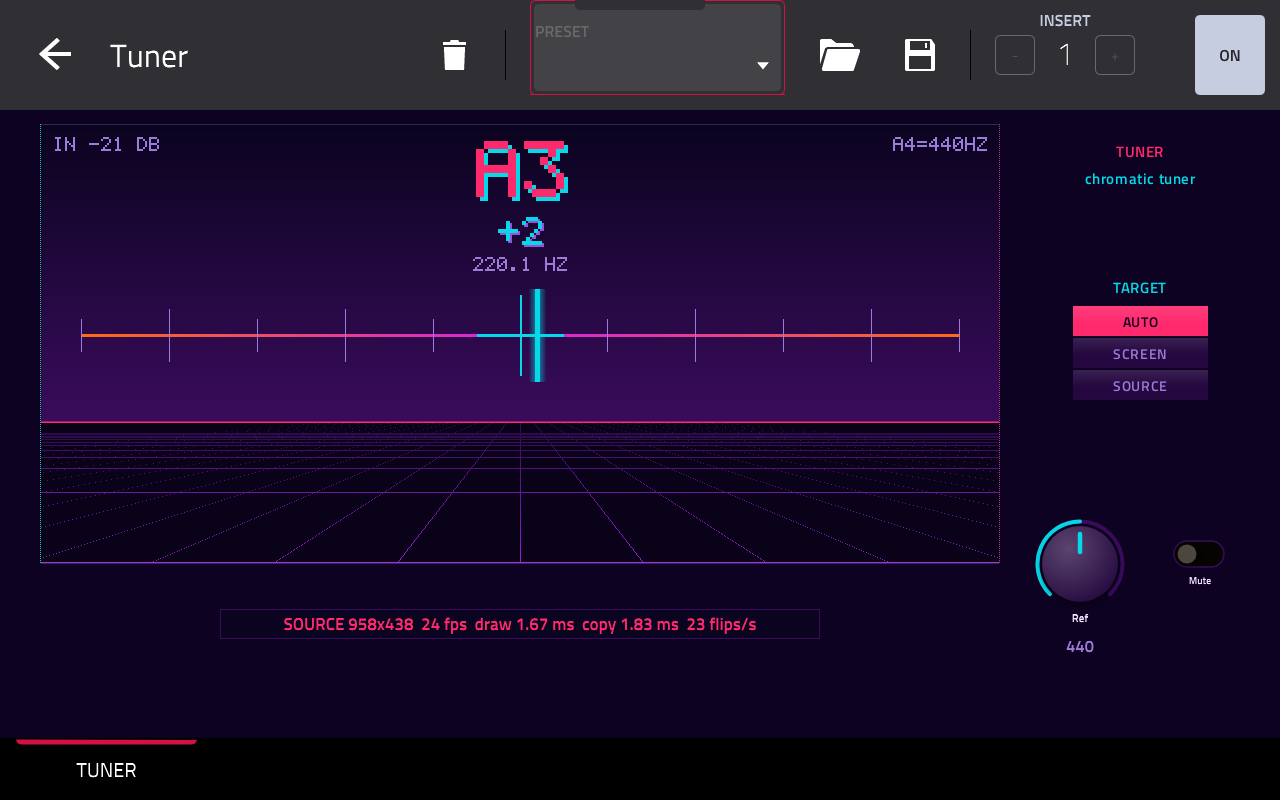
Why it draws its own screen
An MPC plugin's screen is a skin: images and controls that MPC draws, and redraws when a parameter changes. That's fine for knobs, but far too slow for a needle. Tuner's skin leaves a blank area, and the plugin draws into it itself, 20 to 24 times a second, from a background thread:
- It finds its own area. The blank area's left and right edges carry two colour patterns. The drawing thread looks for them on screen, so the screen size, rotation and header height aren't hard-coded.
- It only draws while you can see it. On another page, under a menu, or with another plugin open, the patterns are gone and it leaves the screen alone.
- No flicker. It draws into the buffer MPC paints its own UI into, so MPC shows Tuner's picture along with everything else on the page.
Using it
Put Tuner on a track's insert (channel mixer > EFFECTS) and open it.
| Control | What it does |
|---|---|
| REF | the pitch of A4, 430 to 450 Hz (440 by default) |
| MUTE | silences the track while you tune. Tuner still hears it |
| TARGET | where it draws: AUTO (MPC's own buffer when it finds it, else the screen), SCREEN or SOURCE. Leave it on AUTO |
REF and MUTE are on the first two Q-Links.
The screen shows the note, the cents off and the frequency, with a needle over a ±50 cent scale. The cents turn cyan within 3 cents, yellow within 10, and pink beyond that. The input level is in the top left corner. Below about -50 dB Tuner treats the input as silence: it keeps the last note dimmed for a second and a half, then shows "---".
Good to know
- Tuner follows one note at a time. A chord reads as the period its notes share, usually a low note (the Classic House demo's Rhodes chords read as C1; its single notes read cleanly, like the A3 above).
- It reads from 27 Hz to about 1.4 kHz, from a 5-string bass's low B to the 24th fret of a guitar's high E string.
Offline, every test note lands within 0.4 cents (
tests/pitch_test.c, 2026-10-26). - The pitch detection runs on the drawing thread, never on the audio thread, and only while Tuner's page is on screen.
- A frame copied while MPC refreshes its own UI can tear for one frame. An earlier version's scrolling floor showed it plainly. The background is still now, and with only the needle and text moving no tearing has been seen (Key 37, 2026-10-26).
- With two Tuners in a project, the one inserted last draws (tested offline only).
Installing
Tuner is in the MPC plugin catalog. Or download a zip from this repo's Releases page:
-mpc-sdk.zip: one folder (<Manufacturer> - VST - Tuner) with both the Gen1 (armv7) and Gen2 (aarch64) builds, for MPC OS 3.10.1 or later-mpc-armv7.zipfor Gen1: MPC Live and Live II, One, X, Key 61 and Key 37, Force-mpc-aarch64.zipfor Gen2: Live III, One G2, Key G2, MPC Sample
MPC OS 3.10.1 or later. Unzip the SDK zip and copy its folder into a folder named VST2 Plugins at the root of a
drive (a USB stick, an SD card or the MPC's internal drive). On the MPC, turn on Preferences > Enhancements (Beta) >
Enable Enhancements and External Plugin Support. Tuner then appears under External Plugins; put it on a track's
insert. No SSH or root access is needed.
Before MPC OS 3.10.1 (tested on 3.9.1). That firmware ignores the VST2 Plugins folder, so use the per-build zip
(-mpc-armv7.zip for Gen1, -mpc-aarch64.zip for Gen2) and follow its INSTALL.md: copy the folder to the device over
SSH and run install.sh there. That needs root shell access, and the install restarts MPC (save your project first).
MPC Sample. Take the -mpc-aarch64.zip and follow its INSTALL.md. The Sample has no plugin browser, so Tuner
loads as an insert in the project (for example with the RACK addin), as tested.
Tested (see tested.json):
- 0.0.1, Gen1 zip with its own
install.sh: MPC Key 37, MPC OS 3.9.1.2 (2026-10-26) - 1.1.1: MPC Key 37, MPC OS 3.10.1.12, from
VST2 Plugins(2026-11-12) - 1.1.1: MPC Sample (aarch64), 1.3.0.12, as a rack insert (2026-11-12)
No Gen2 MPC (Live III, One G2, Key G2) has been tested yet, only the MPC Sample.
CPU
Measured on an MPC Key 37 (Gen1, RK3288, two cores) with MPC running, 2026-10-26. The work is on Tuner's drawing thread, not in MPC's audio callback, so this is a share of one CPU core:
| Input | Drawing thread |
|---|---|
| silent, the page open | 7.2% of a core |
| the Classic House demo's Rhodes playing, the page open | 9.8% of a core |
| another page on screen | almost nothing: a few small reads per frame |
A frame takes 1.2 to 2.0 ms to draw and 1.7 to 1.8 ms to copy into MPC's buffer.
On the audio thread Tuner only copies each block into a buffer. The standard release bench (mpc-vst-plugins'
tools/bench.sh, result in vst/bench.txt) gives it a PASS: 1.0% of the block budget at p99, 1.9% in the worst
block (2026-10-26). Tuner's page isn't on screen during the bench, so its drawing thread stays idle there and the
figures above are the ones for drawing.
How it's built
src/engine.cis the tuner, an mpc-vst-plugins engine. Each frame it runs YIN (de Cheveigné and Kawahara, 2002) on the last 93 ms of input, decimated to 11025 Hz, then measures the period again at 44.1 kHz around what YIN found, takes the median of the last five readings, and draws.src/screendraw.cfinds the display, the blank area and MPC's UI buffer, runs the drawing thread, and copies each frame in. It checks the edge patterns column by column as it copies, so a page change halfway through a frame can't leave Tuner's pixels on the next page.vst/holds the plugin's definition: parameters, skin layout and the blank area's image (vst/canvas.png, drawn bytools/make_canvas.pyfrom the colours insrc/screendraw.h).vst/params.lockkeeps the parameter order fixed, so Q-Link maps and automation in saved projects keep working after an update.
Build and test
You need Docker (with QEMU for the ARM builds) and an mpc-vst-plugins checkout next to this one (or set
MPC_VST=<path>).
tests/run.sh     # offline tests on x86 under ASan/UBSan, then the wrapper's host test
vst/build.sh     # vst/build/tuner.so (armv7), vst/build/aarch64/tuner.so, the skin and the plugin-list entry
The pitch test plays 19 bass, guitar and synth notes, in tune, sharp, flat and against a 432 Hz reference, and checks the note and the cents Tuner settles on. It also checks that silence clears the note, and pass-through and mute.
Releases come from CI. Run the Release workflow with a version, and it attaches both zips to a draft release. Install that zip on a device, then publish the draft (as a prerelease while the version is 0.x).
Vibe Coded
This project was built with Claude Code: the pitch detection, the screen drawing, the skin and the tests.
Credits and license
The idea of a plugin drawing into MPC's display memory came from Lewinator56's experiments, shared with the MPC plugin community. Tuner's code is its own.
Tuner is MIT (LICENSE).
Recent releases
-
Release notes
A chromatic tuner insert that draws its needle straight onto the MPC's screen.
Requirements
- A first-generation MPC OS standalone device (32-bit ARM, like the Force, MPC Live / Live II, One, X and Key 61). The installer refuses anything else. Newer models are untested.
- Root shell access (SSH) to the device, for the scripted install below. Stock MPC OS doesn't offer this; you need a
modded unit. On MPC OS 3.10.1 and later you can skip it entirely: copy the plugin folder into
VST2 Plugins(next section). - Installing plugins this way is unofficial: back up first, use at your own risk.
Install (scripted)
- Unzip, then copy the whole folder to the device, e.g.
scp -r Tuner-1.1.4 root@<device-ip>:/tmp/ - Run it:
ssh root@<device-ip> sh /tmp/Tuner-1.1.4/install.sh
The installer checks the device, stops MPC (save your project first), copies
portable/jacob-sabella - VST - Tuner/(the plugin, its skin and its data, as one folder) into the folder this MPC OS loads plugins from (on MPC OS 3.10.1 and later<drive>/VST2 Plugins, when that folder exists or already holds this plugin; before 3.10.1/sdcard/Synths; it prints the one it uses), backs upMPC.settings, adds the plugin to MPC's plugin list from the folder'splugin-meta.xmland starts MPC again. Running it again upgrades in place, keeping your own files. An older install of this plugin (the previous layout, with the.soin/sdcard/vst) is replaced, not duplicated.-yskips the confirmation prompt;-t <folder>installs into another Synths folder (for example on a card).Then add Tuner to a track from the plugin browser (Insert effects). Its screen appears in the plugin view, and the Q-Links follow the page.
Full instructions, including installing by hand, are in
INSTALL.mdinside the zip.Changes in 1.1.4
- MPC Sample 1.4 Knob FX knobs: the Sample's knobs now control Ref and Mute, with those labels. Before,
they got parameters 0 to 5 labelled
Param 1toParam 6.
Built by GitHub Actions from jacob-sabella/mpc-vst-tuner@b589ed5 with mpc-vst-plugins@1b78cfa.
-
Release notes
A chromatic tuner insert that draws its needle straight onto the MPC's screen.
Requirements
- A first-generation MPC OS standalone device (32-bit ARM, like the Force, MPC Live / Live II, One, X and Key 61). The installer refuses anything else. Newer models are untested.
- Root shell access (SSH) to the device, for the scripted install below. Stock MPC OS doesn't offer this; you need a
modded unit. On MPC OS 3.10.1 and later you can skip it entirely: copy the plugin folder into
VST2 Plugins(next section). - Installing plugins this way is unofficial: back up first, use at your own risk.
Install (scripted)
- Unzip, then copy the whole folder to the device, e.g.
scp -r Tuner-1.1.3 root@<device-ip>:/tmp/ - Run it:
ssh root@<device-ip> sh /tmp/Tuner-1.1.3/install.sh
The installer checks the device, stops MPC (save your project first), copies
portable/jacob-sabella - VST - Tuner/(the plugin, its skin and its data, as one folder) into the folder this MPC OS loads plugins from (on MPC OS 3.10.1 and later<drive>/VST2 Plugins, when that folder exists or already holds this plugin; before 3.10.1/sdcard/Synths; it prints the one it uses), backs upMPC.settings, adds the plugin to MPC's plugin list from the folder'splugin-meta.xmland starts MPC again. Running it again upgrades in place, keeping your own files. An older install of this plugin (the previous layout, with the.soin/sdcard/vst) is replaced, not duplicated.-yskips the confirmation prompt;-t <folder>installs into another Synths folder (for example on a card).Then add Tuner to a track from the plugin browser (Insert effects). Its screen appears in the plugin view, and the Q-Links follow the page.
Full instructions, including installing by hand, are in
INSTALL.mdinside the zip.Changes in 1.1.3
- MPC Sample 1.4: when Tuner is a pad's Knob FX, MPC makes two instances and plays audio through only one. The page now waits for that instance's audio before it opens (with mpc-addin-sample-draw-handler). On a Sample 1.4 device a second page still showed up (2026-11-25), so this is not fixed yet. Nothing changes on other MPCs.
Built by GitHub Actions from jacob-sabella/mpc-vst-tuner@49245f5 with mpc-vst-plugins@ef08816.
-
Release notes
A chromatic tuner insert that draws its needle straight onto the MPC's screen.
Requirements
- A first-generation MPC OS standalone device (32-bit ARM, like the Force, MPC Live / Live II, One, X and Key 61). The installer refuses anything else. Newer models are untested.
- Root shell access (SSH) to the device. Stock MPC OS doesn't offer this; you need a modded unit.
- Tested on MPC OS with a Force. Installing plugins this way is unofficial: back up first, use at your own risk.
Install (scripted)
- Unzip, then copy the whole folder to the device, e.g.
scp -r Tuner-1.1.2 root@<device-ip>:/tmp/ - Run it:
ssh root@<device-ip> sh /tmp/Tuner-1.1.2/install.sh
The installer checks the device, stops MPC (save your project first), copies
portable/jacob-sabella - VST - Tuner/(the plugin, its skin and its data, as one folder) into/sdcard/Synths, backs upMPC.settings, adds the plugin to MPC's plugin list from the folder'splugin-meta.xmland starts MPC again. Running it again upgrades in place, keeping your own files. An older install of this plugin (the previous layout, with the.soin/sdcard/vst) is replaced, not duplicated.-yskips the confirmation prompt;-t <folder>installs into another Synths folder (for example on a card).Then add Tuner to a track from the plugin browser (Insert effects). Its screen appears in the plugin view, and the Q-Links follow the page.
Full instructions, including installing by hand, are in
INSTALL.mdinside the zip.
Built by GitHub Actions from jacob-sabella/mpc-vst-tuner@66c3478 with mpc-vst-plugins@f1528a3.