ArpeggiGator
A performance mod for the MPC Sample that adds five musical engines (ARP, MELODY, MUTATOR, ACCORDATOR, ORBITATOR) inside 16 Levels while keeping the stock workflow.
Screenshots (6)
Images: from OSCILLUNE/ArpeggiGator
About
Five musical engines for the AKAI MPC Sample — all hidden inside 16 Levels.
ARP · MELODY · MUTATOR · ACCORDATOR · ORBITATOR
Latest published release: v0.0.7.4 — native audio engine, first-pad fix, STOP repaint fix, and native pad LED restoration.
Current release: 0.0.7.4 — restores native pad LED colours on screen/mode exits (no blackout in MUTE) on top of the STOP repaint fix. Both artifacts are attached to the release linked below.
❤️ SPONSOR:  /
 ☕
DOWNLOAD · ⬇️ SD-card ZIP for MPC · ⬇️ Emulator .so for QA/DEV
❤️ SPONSOR: / ☕
Latest videos — OSCILLUNE on YouTube
 This Mod Makes AKAI MPC Sample Play Music for You — Ar |
 NEW! ArpeggiGator — MOD for AKAI MPC Sample 🧩 |
 NEW! ArpeggiGator ARP — MOD for AKAI MPC Sample 🔥 |
Installation · Interface · Shortcuts · Parameters · Modes · Procedures · Download
⚠️ BETA SOFTWARE — USE AT YOUR OWN RISK
ArpeggiGator is BETA software. It is unofficial, experimental and provided “AS IS”, without warranties of any kind. You install and use it entirely at your own risk.
Bugs or incompatibilities may cause crashes, unexpected behaviour, loss of work, damaged or corrupted project files, SD-card data loss, or other software or device problems. Back up your projects and the entire original SD card (including any existing
autorun/folder) before installation.To the maximum extent permitted by applicable law, OSCILLUNE and the project's authors and contributors accept no liability for any loss, damage, data loss, device malfunction or other consequences arising from installing or using ArpeggiGator. Nothing in this notice excludes rights or liabilities that cannot legally be excluded.
This mod does not replace or flash the stock MPC Sample firmware. It adds optional functionality within 16 Levels while preserving the normal MPC workflow. However, that does not eliminate all risks of running experimental software.
What it is
ArpeggiGator is an unofficial, performance-focused mod for Akai MPC Sample firmware 1.3.0.12. It adds five optional musical engines inside the existing 16 Levels mode. Play evolving arpeggios, melodies, chords or orbital patterns using your own samples, with hands-on controls for rate, patterns and HOLD.
Your MPC stays your MPC. The mod loads from the SD card at startup, copies its library to volatile /run and leaves the verified firmware untouched. Outside the mod's controls you can keep using the MPC Sample as usual.
- Five engines: classic patterns, melodic phrases, evolving mutations, expressive chords and generative ambient movement.
- Hands-on controls: three soft keys, the DATA encoder and your pads.
- Original visuals: a pixel gator and a different scene for every mode.
Interface tree
MPC Sample (firmware)
└── SAMPLE screen
    └── 16 LEVELS
        └── [SHIFT held OR engine enabled] → ArpeggiGator overlay
            ├── left: animation (a different gator for each mode)
            ├── top right: MODE + parameters + RATE + HOLD
            └── bottom: B1 / B2 / B3 captions (only while SHIFT is held)
Shortcuts
All shortcuts work only in 16 Levels (exceptions: STOP and PLAY).
| Button | Without SHIFT | With SHIFT |
|---|---|---|
| B1 (SCREEN 1) | — | Change mode: Off → ARP → MELODY → MUTATOR → ACCORDATOR → ORBITATOR → Off |
| B2 (SCREEN 2) | — | Parameter 1 — depends on the mode |
| B3 (SCREEN 3) | — | Parameter 2 — depends on the mode |
| DATA (knob) | turn = RATE, press = HOLD on/off | no action |
| 16 LEVELS | enter/exit the view | does not exit the view |
| PAD 1…16 | feeds notes into the engine | firmware shortcut, not a note |
| STOP | single press = native behaviour; double press within ≤650 ms = full reset | — |
| PLAY | the mod only reads the firmware transport | — |
The three B buttons are the soft keys immediately above the MPC display.
Parameters
| Mode | B2 — parameter 1 | B3 — parameter 2 |
|---|---|---|
| ARP | Pattern: UP, DOWN, UP/DOWN, DOWN/UP, CONVERGE, DIVERGE, RANDOM, PLAYED | Additional octaves: +0 → +1 → +2 → +3 |
| MELODY | Phrase length: 2BAR → 4BAR → 8BAR → 16BAR |
Preset phrase: MEL1 … MEL9 |
| MUTATOR | Mutation intensity: SUBTLE → WILD → CHAOS | Freeze: FRZ OFF ⇄ FRZ ON |
| ACCORDATOR | Chord mood: WARM → SAD → SPACE → CINEMA | Style: STRUM → PULSE → WAVE |
| ORBITATOR | Atmosphere: AMBIENT → SPACE → DARK → RHYTHM | Dynamics: CALM → FLOW → WILD |
Modes
| Mode | What it does |
|---|---|
| ARP | Accumulates held pads and plays them back in the selected pattern. HOLD toggles individual pad bits (XOR). |
| MELODY | Plays ready-made melodic phrases from a single root pad; a new pad takes over the voice. |
| MUTATOR | Evolves the buffer every phrase pass; Freeze keeps the next loops identical. |
| ACCORDATOR | Turns one pad into flowing chord voicings; mood sets the intervals, style sets the articulation. |
| ORBITATOR | Generative notes drifting across a scale; dynamics set the wandering radius. |
Tip: start with ORBITATOR → AMBIENT → CALM for evolving soundscapes, or ACCORDATOR → WARM → WAVE for lush harmonic movement.
| Mode | Without SHIFT | With SHIFT |
|---|---|---|
| ARP | 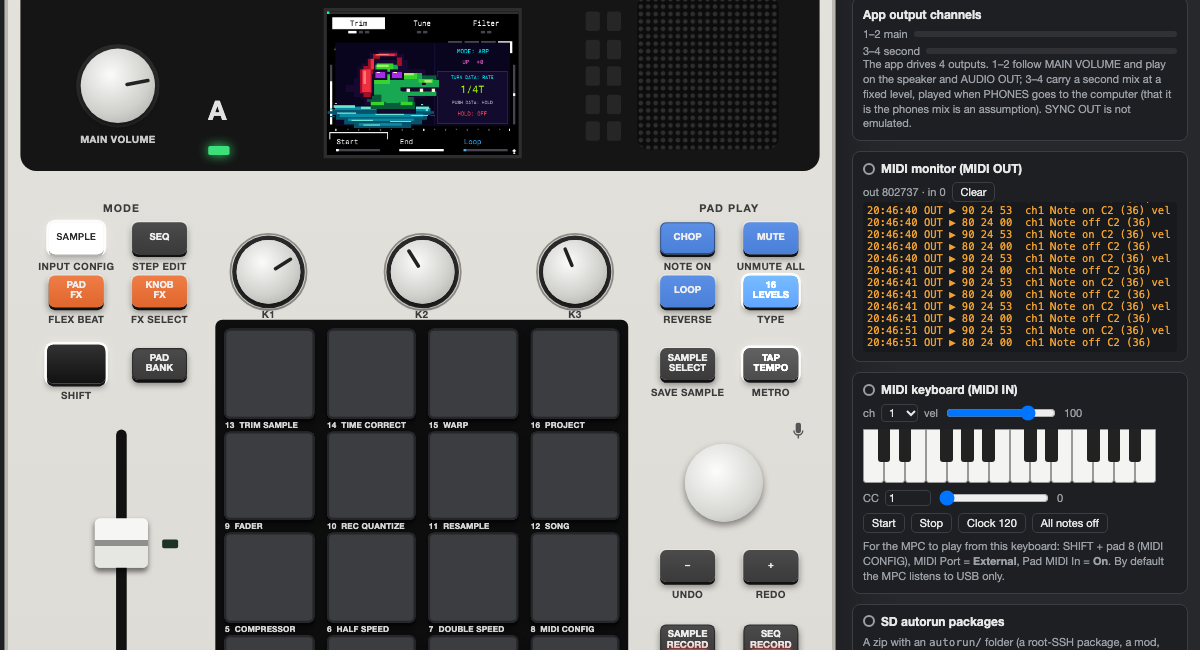 |
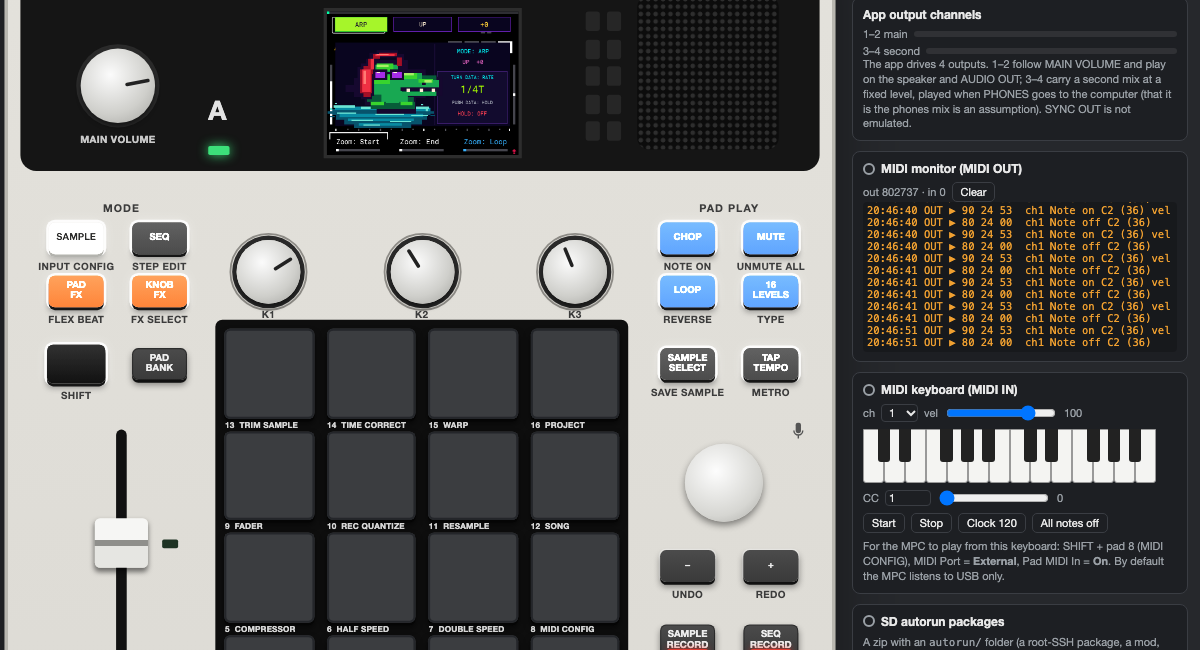 |
| MELODY | 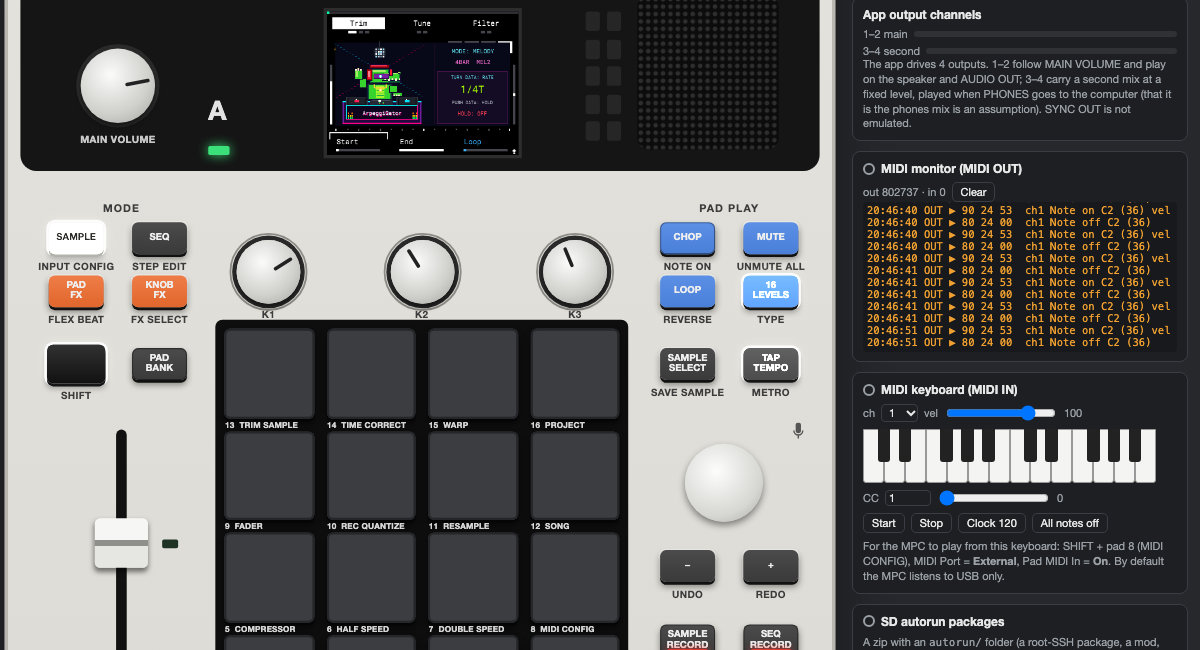 |
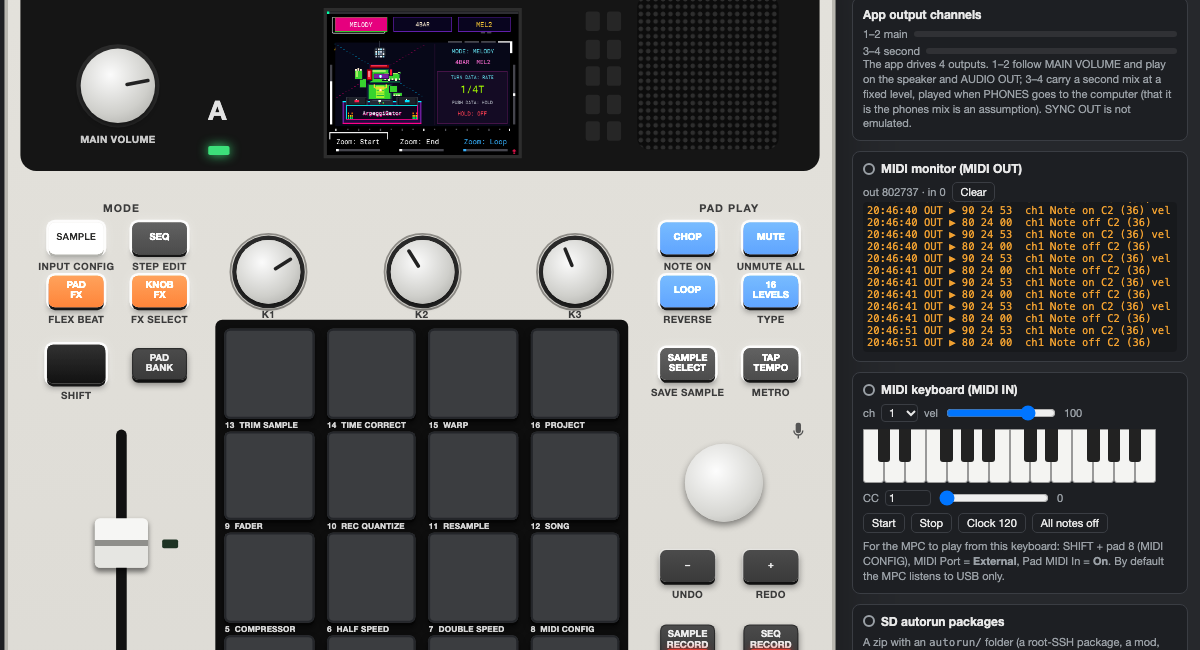 |
| MUTATOR | 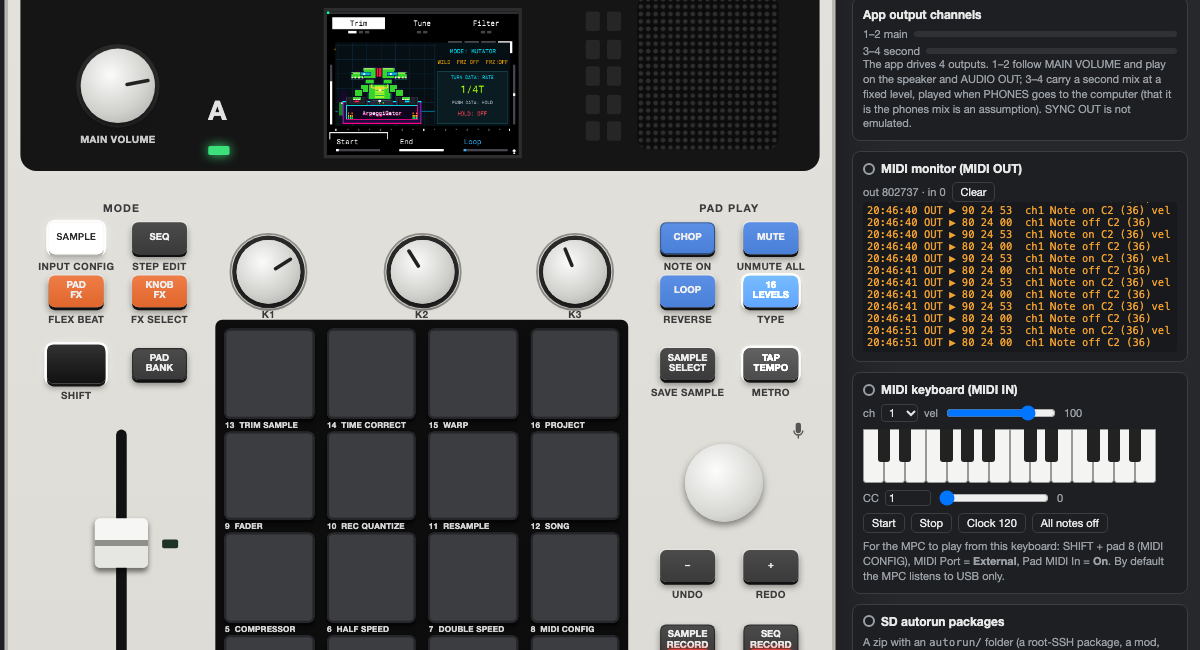 |
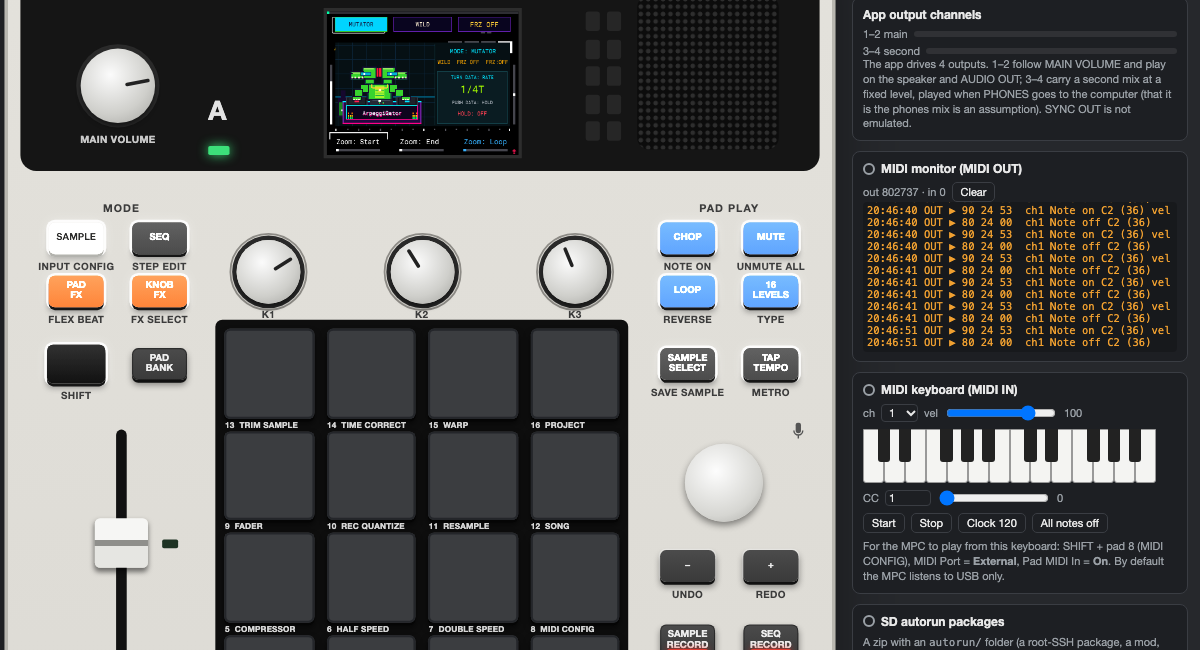 |
| ACCORDATOR | 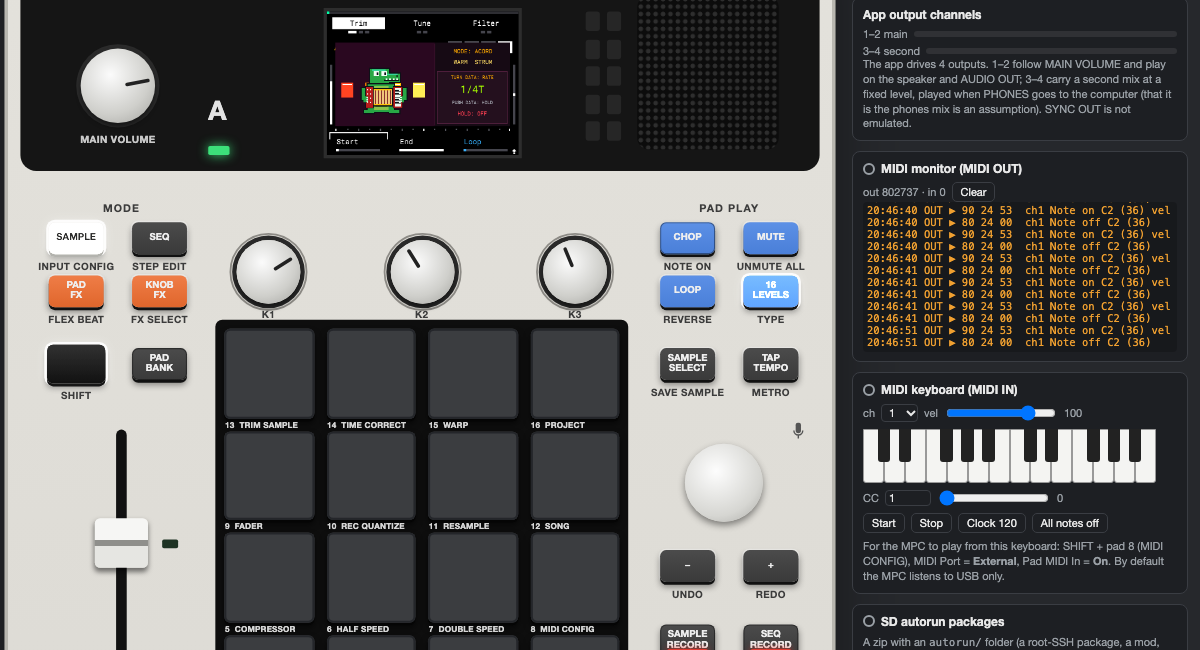 |
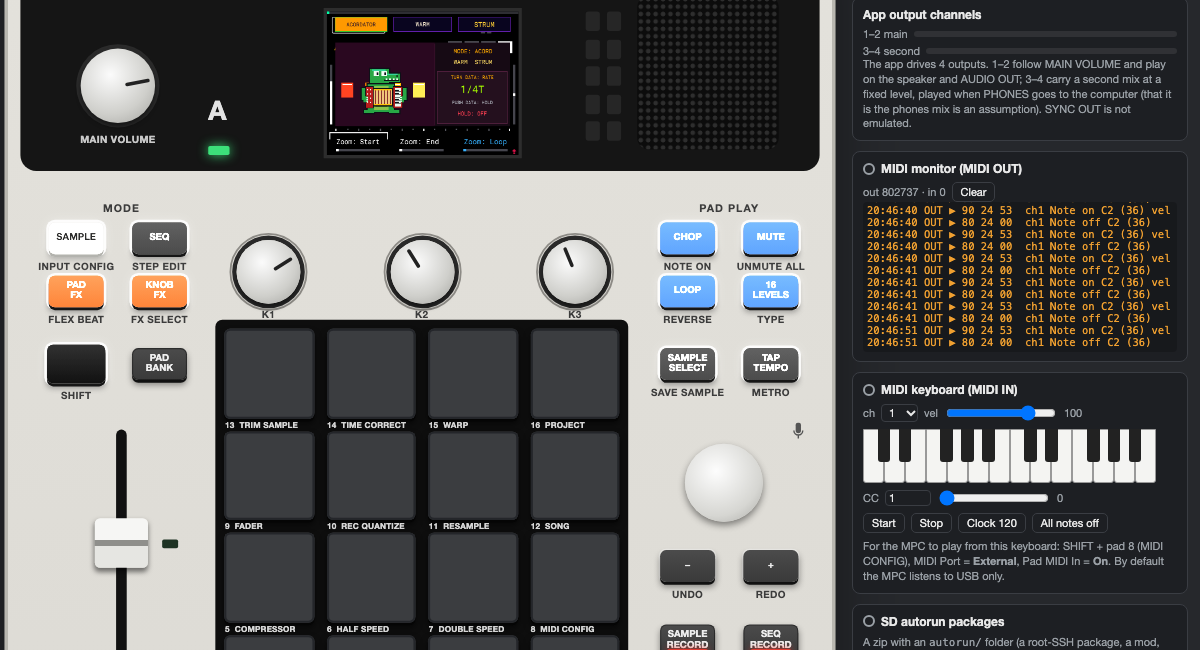 |
| ORBITATOR | 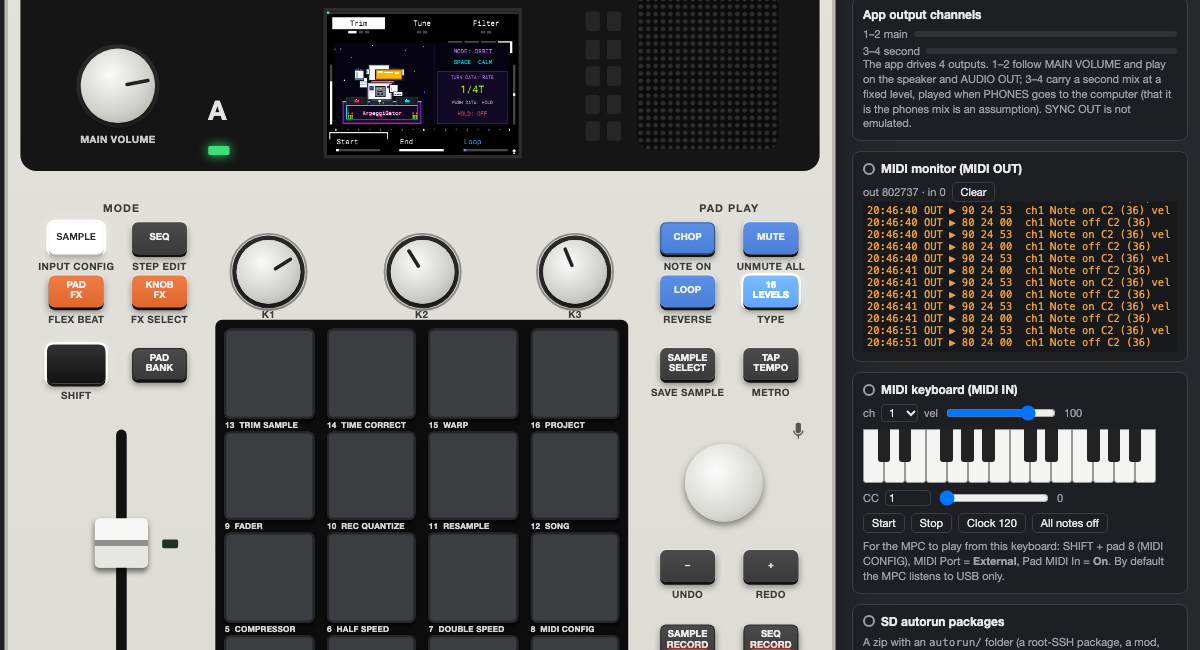 |
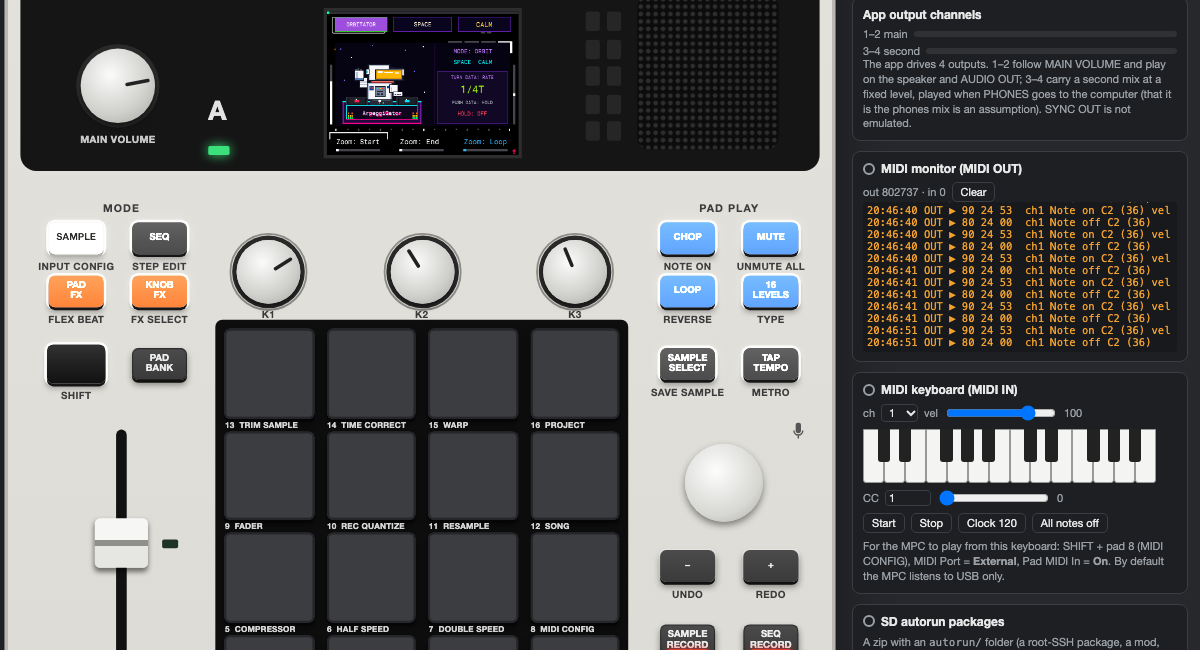 |
Screenshots: DEV, build 34a9ec26…, 18 Nov 2026. The screenshots show the original interface layout; 0.0.7.2 changes only the chord-mode label to ACCORDATOR / MODE: ACCORD.
Procedures
- Enable the mod: open Sample → 16 LEVELS, hold SHIFT, then use SHIFT + B1 to pick a mode and SHIFT + B2/B3 for its parameters.
- HOLD and notes: press DATA to toggle HOLD. In melodic/generative modes a tapped pad becomes a latch (green) and a new pad takes over the voice. In ARP, HOLD XORs pad bits.
- Freeze (MUTATOR): hold SHIFT and tap B3 to toggle
FRZ ON/OFF; subsequent loops play identically. - Swap samples while playing (test-confirmed): set MELODY + HOLD with the sequence running, go back to the Sample tab — the music does not stop — tap pads to change one sample for the whole sequence, then return to 16 Levels.
- STOP: a double press within about 650 ms clears engines, HOLD, the active sample and the LEDs.
Installation
Compatibility: designed for AKAI MPC Sample firmware 1.3.0.12. Tested in the virtual emulator and confirmed on physical hardware (30–60 min test session). A downloadable ZIP is available in the v0.0.7.4 release, but this is still BETA software — back up everything before installing.
- Back up your entire SD card to your computer before making any changes.
- MOVE / COPY / BACK UP your existing
autorun/folder. If the SD card already has anautorun/folder, move it to your computer — or copy it there, verify the backup, and then remove the originalautorun/folder from the SD card. The card must have no existingautorun/folder before installing ArpeggiGator. NEVER merge the new files into an existingautorun/folder. - Download
arpeggigator-v0.0.7.4.zipfrom the v0.0.7.4 release. - Extract the ZIP. You should see a new
autorun/folder inside. - Copy the NEW
autorun/folder to the root of the SD card, preserving all files and subfolders. The card should containautorun/autorun.sh— not a ZIP file placed on the card. - Safely eject the SD card, power off the MPC Sample, insert the card and power it on.
- Open Sample → 16 Levels and use the controls above.
Already using another mod? ArpeggiGator's autorun/ folder replaces the previous one on that card; it is not merged with it. Keep the old autorun/ backup safe so you can restore it later. Running multiple autorun mods together is not supported or verified.
Uninstall / restore: power off the MPC, remove the ArpeggiGator card or restore your original backed-up autorun/ folder, then restart.
Preview
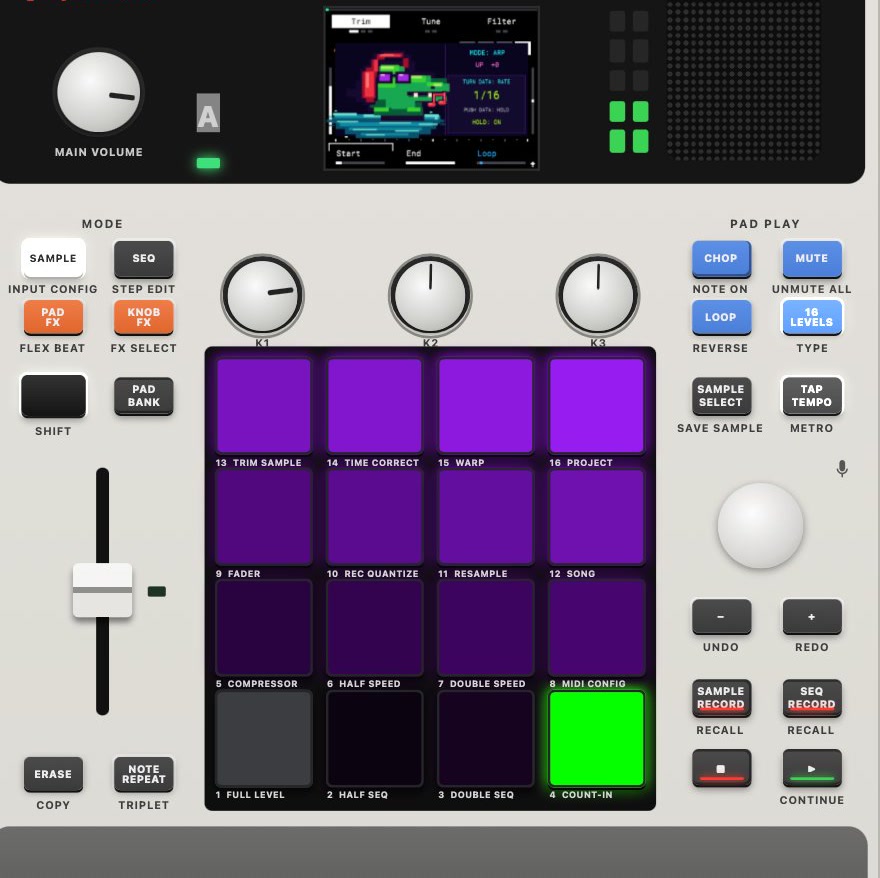
Running in the MPC Sample emulator
⚠️ Compatibility — read before you insert the card
TESTED: ArpeggiGator v0.0.7.4 was developed and tested in the virtual MPC Sample emulator (QA/DEV) and confirmed on physical AKAI MPC Sample hardware, on firmware 1.3.0.12 (guard
44507c7a7d3029c411b2e3780ea286ca3e08b7e3ffd7b5047d52f73bf5299d1f). The 0.0.7.x package ships anative-audiobuild targeted at firmware 1.3.0.12 with hook-signature verification. Emulator audio (MPC_MOD_FEATURES=emulator-audio) was used only in experimental phases; the release build uses native audio and is firmware-guarded.NOT TESTED: No other firmware version, no other MPC model, and no other operating system or environment has been tested. Compatibility outside the tested emulator + firmware 1.3.0.12 combination is unknown and unverified.
BEFORE YOU INSERT THE CARD: make a complete backup of your entire original SD card and all your projects to a computer. Verify the backup, then install. If the card already has an
autorun/folder, back it up and remove it first — do not merge.This is BETA software, unofficial and provided "AS IS", entirely at your own risk.
Download
Version 0.0.7.4 — one codebase, two delivery profiles. Both artifacts are published under the v0.0.7.4 release.
| Artifact | Purpose | SHA-256 |
|---|---|---|
arpeggigator-v0.0.7.4.zip |
SD card → physical MPC Sample 1.3.0.12. Unzip and copy autorun/ to the card. |
dea08ff69b0db23a0f79e053d40f8acede78801139e5f102cd41464ab7119c97 |
arpeggigator-v0.0.7.4-lab.so |
Emulator / QA-DEV via python3 lab.py preload …. This is not an SD-card package. |
60b1cbed5a74def68873fb6ef898946e66619a9ad8198aaf9d9da458375f50ad |
Verify the package before inserting the card. The expected SHA-256 is the value in the table above:
shasum -a 256 arpeggigator-v0.0.7.4.zip
- Verified environment: firmware-targeted aarch64 MPC Sample emulator and physical MPC Sample hardware.
- Independent project: not affiliated with, endorsed by or supported by AKAI Professional.
Development notes
Interested in the implementation? See the changelog and the user manual.
Contact
Questions, bug reports or feedback: ArpeggiGator@proton.me
Built by OSCILLUNE · Changelog · License
License: GNU GPL-3.0 — see LICENSE.
Recent releases
-
Release notes
ArpeggiGator v0.0.7.4
Native pad LED restoration fix, on top of the v0.0.7.3 STOP repaint fix.
What's new
- Removed
extinguish_pads(): leaving 16 Levels / Sample for MUTE no longer forces all 16 pads to black. The mod now callslighting::restore_pad_rgbs(), which actively re-sends the MPC's native colours, so active tracks stay lit (orange in MUTE, cyan in Sample) without touching a pad. - Applies to engine-state reset, background-playback exit and
Drop. - Unit test
mutator_mute_sample_pad_lighting_restorationadded; full suite 88 passed, 0 failed. - Verified on DEV (:8765), QA (:8766) and on physical AKAI MPC Sample (firmware 1.3.0.12) by the project owner.
Downloads
File Purpose SHA-256 arpeggigator-v0.0.7.4.zipPhysical MPC Sample 1.3.0.12 - extract autorun/to a clean SD card. Includes the pre-insertion handoffdea08ff69b0db23a0f79e053d40f8acede78801139e5f102cd41464ab7119c97arpeggigator-v0.0.7.4-lab.soEmulator / QA - python3 lab.py preload <path>. Not an SD-card package60b1cbed5a74def68873fb6ef898946e66619a9ad8198aaf9d9da458375f50adPackage integrity: 20/20 checks PASS (
scripts/verify-v070.py).Note
Firmware-guarded (hash
44507c7a...) and writes only to/run. Removing the card without a restart leaves the module loaded until power cycle. Beta software - back up your SD card and projects before installing. Independent project, not affiliated with AKAI Professional. - Removed
-
Release notes
ArpeggiGator v0.0.7.3
Repaint fix after STOP in 16 Levels, on top of the native audio engine and the first-pad fix.
What's new
- Dashboard refresh and stale-frame cleanup after STOP (code 81) in 16 Levels — the LCD no longer freezes on the last frame.
- Verified in the DEV/QA emulator and confirmed on physical AKAI MPC Sample hardware (30-60 min session, firmware 1.3.0.12).
Downloads
File Purpose SHA-256 arpeggigator-v0.0.7.3.zipPhysical MPC Sample 1.3.0.12 - extract autorun/to a clean SD card1d1a884cfbe8afaf92e47b64567a4d0f7de5110a99c20319ec42a617ddaf4369arpeggigator-v0.0.7.3-lab.soEmulator / QA - python3 lab.py preload <path>. Not an SD-card package4799d4a0279ee47269ca7a45ec9497a891b611953104c75023179e5b0da6b3e7Note
Firmware-guarded (hash
44507c7a...) and writes only to/run. Removing the card without a restart leaves the module loaded until power cycle. Beta software - back up your SD card and projects before installing. Independent project, not affiliated with AKAI Professional. -
Release notes
ArpeggiGator v0.0.7.2
Cosmetic caption release. Same audio engine, same firmware guard and same safety guarantees as v0.0.7.1.
What's new
ACORDATOR→ACCORDATORMODE: ACORD→MODE: ACCORD- MUTATOR no longer prints the freeze state twice:
SUBTLE FRZ:OFFinstead ofSUBTLE FRZ OFF FRZ:OFF. - QA visual verification 10/10, 87/87 tests, 20/20 package checks, 15/15 independent verification.
Downloads
File Purpose SHA-256 arpeggigator-v0.0.7.2.zipPhysical MPC Sample 1.3.0.12 — extract into autorun/on a clean SD card79d7db740ef1d27ac5250c33c27fc186beaa7129f8890ccbd295515da2924f2barpeggigator-v0.0.7.2-lab.soEmulator / QA — python3 lab.py preload <path>3e2fac83cc4a9c5fe3421b2e58b4ec47f1943be60d1988cec01ef013d785aca8Note
Firmware-guarded (hash
44507c7a…) and writes only to/run. Removing the card without a restart leaves the module in memory; the console returns to its factory state after a restart.