MarsPad
A macOS sample librarian and pad-bank planner for the MPC Sample. Browse and audition a local library, assign sounds to banks A–H, then export a .xpj project or audio copies.
Screenshots (2)
Images: from jonmitten/marspad
About
A local macOS sample librarian and pad-bank planner for Akai MPC Sample owners. MIT licensed. Unaffiliated with Akai Professional or Samples from Mars.
Current release: 0.4.0 prototype
- Scan extracted audio collections without modifying source files. ZIPs are skipped.
- Search by filename or folder, filter collections and inferred sound categories.
- Audition audio using asynchronous macOS playback; selecting a sound immediately detaches the previous preview without waiting for a full-file decode. Format support depends on macOS.
- Assign samples to 16 pads across banks A–H by dragging or using Assign Selected Sound.
- Auto-fill empty pads in the current bank using the current library filters.
- Save/open editable
.marspadkit plans. These reference original absolute paths. - Export unchanged sample copies and a CSV pad map into a fresh output folder.
- Export a native
.xpjplus companion audio directory using a built-in blank project; no device template is required.
Native export is experimental. A previous generated project failed to load on the hardware. Version 0.2.4 preserves native serialization order and scalar formatting. A user subsequently confirmed a successful three-sample load with correct assignments at A01, A02 and A11, full playback, and a device save/reload round trip. Subsequent user testing confirmed bank order across A–H, including A16 → B01 and H16. This supports the tested workflow on that unit, rather than establishing compatibility for every project or firmware version. Audio-only export remains available for manual assignment. The app writes new folders, never firmware or device system files.
Keyboard controls
Click the sample list or a pad to use these keys. Shortcuts are inactive while editing text or using a file dialog; normal typing, text-cursor arrows, and Command-key shortcuts are preserved.
| Key | Action |
|---|---|
| W / S | Previous / next sample in the filtered library (auditions on selection) |
| D | Play the selected library sound, even if it is not assigned to a pad |
| F | Play the sound assigned to the selected pad |
| A | Stop playback |
| Arrow keys | Move through the selected bank's 4 × 4 pad grid |
| 1–8 | Select banks A–H, keeping the same pad position |
| Space | Assign the selected library sound to the selected pad |
| C | Clear the selected pad |
| ⌘Z | Undo the last kit edit |
| ⌘⇧Z | Redo the last undone kit edit |
Pad movement stops at the grid edges. Up moves toward pads 13–16; Down moves toward pads 1–4. W/S keeps the library selection visible as you browse.
Undo and redo
Undo/redo covers assignments (including drag-and-drop), clearing a pad, Clear Bank, auto-fill, and kit renaming. Each Clear Bank or auto-fill operation is one action; renaming while editing the name field is grouped into one kit edit. Undo/redo returns to the edited bank and pad. The undo/redo buttons beside the kit name show the action they will reverse in their tooltips.
History retains the latest 100 edits for the open kit. A new edit after undo drops
the redo branch; no-op actions do not add history. Saving keeps history and tracks
whether the restored state differs from the last save. New/Open Kit starts a new
history. History is not stored in .marspad files. Navigation, previewing, filtering,
exports and filesystem operations are not kit edits and are not undone.
While typing in a text field, standard text undo/redo takes precedence. Click the sample list or a pad to return to kit shortcuts. Enter has no pad-play binding.
Inclusion and exclusion filters
Choose a collection and sound type as before. Use Exclude sounds… to remove one or more types—for example, Kick and Loops—while leaving All sounds selected. Exclusions apply to browsing and auto-fill, and never change pads you have already assigned. A kick loop matches both Kick and Loops, so either exclusion removes it. Clear exclusions through the same menu.
Search supports negative terms and quoted phrases:
-kick -loops: omit kicks and loops.808 -loops: find matching 808 sounds while omitting loops."No Accent": find samples whose documented accent code means No Accent.
These filters work together. A Musical key menu appears when filenames contain
explicit major/minor keys, such as F#m or Dmaj; this is filename metadata,
not audio key detection. Existing saved kit plans remain readable.
Samples from Mars information files
Scanning also reads local RTF information/reference documents (up to 2 MB each), skipping installation and coupon documents. Source files remain unchanged and no pack documentation is bundled with the app or repository.
- Reference entries are matched by exact sample filename; matching chord progression text becomes searchable and appears in the sample details.
- When a collection documents all three A/B/C accent codes, those meanings are expanded for the filename's second-token accent code. The original code and sample name remain unchanged. Ambiguous or undocumented codes are not guessed.
- Search collection notes optionally includes general pack descriptions in searches. These are pack-level matches, not properties asserted for every sound.
- Collection Info… opens the original document of your choice for reference.
For best coverage, select the extracted library root or an entire pack (including its Docs folder), rather than only its WAV subfolder. Rescan with Choose Library if the documents or extracted samples change.
Getting started in pictures
The sample collections shown below are supplied by the user and are not bundled with MarsPad.
1. Choose your sample library
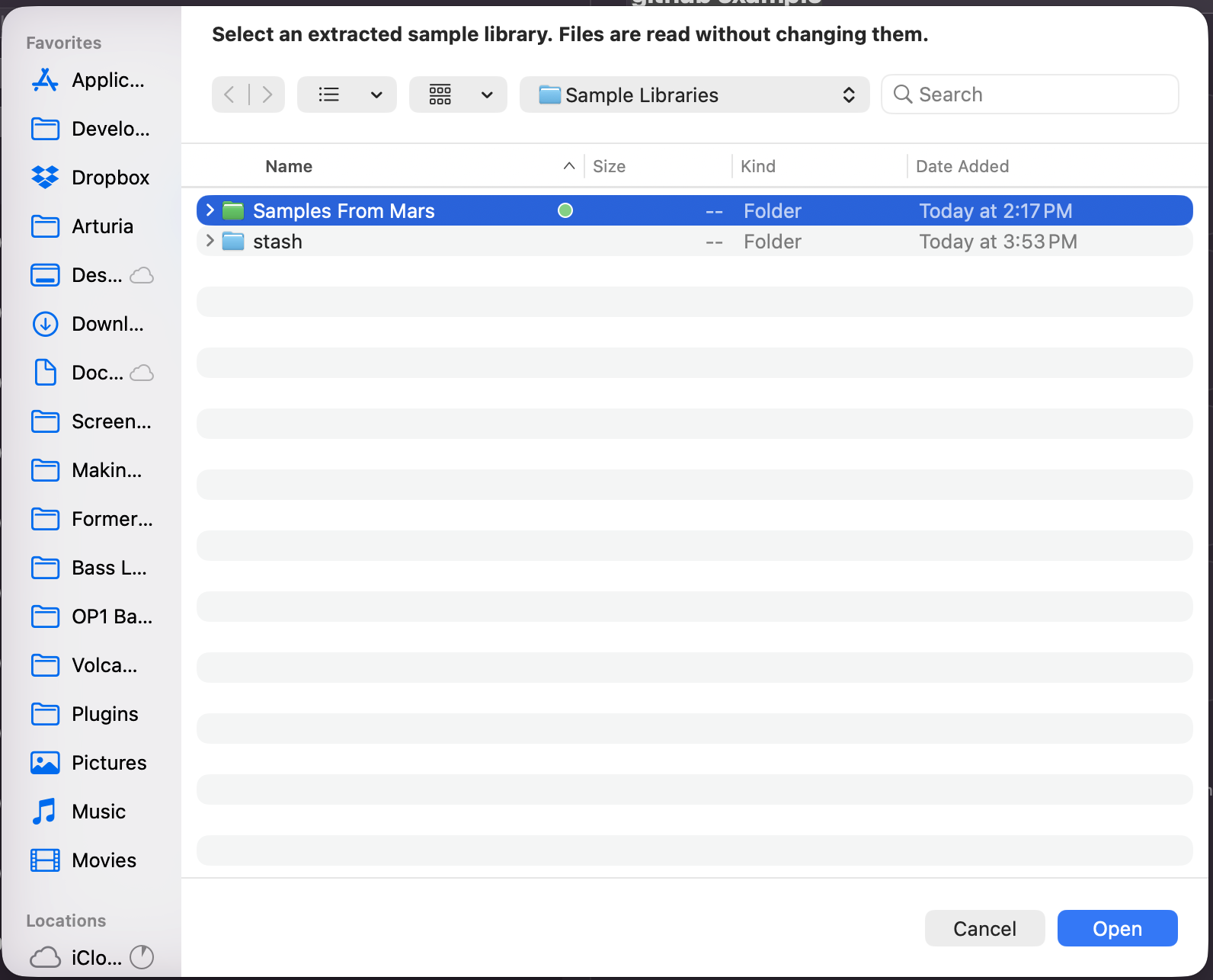
Click Choose Library… and select the folder containing your extracted samples. MarsPad indexes the audio without changing the original files. For responsive previewing, choose a locally downloaded library rather than cloud-only files.
2. Browse your sounds
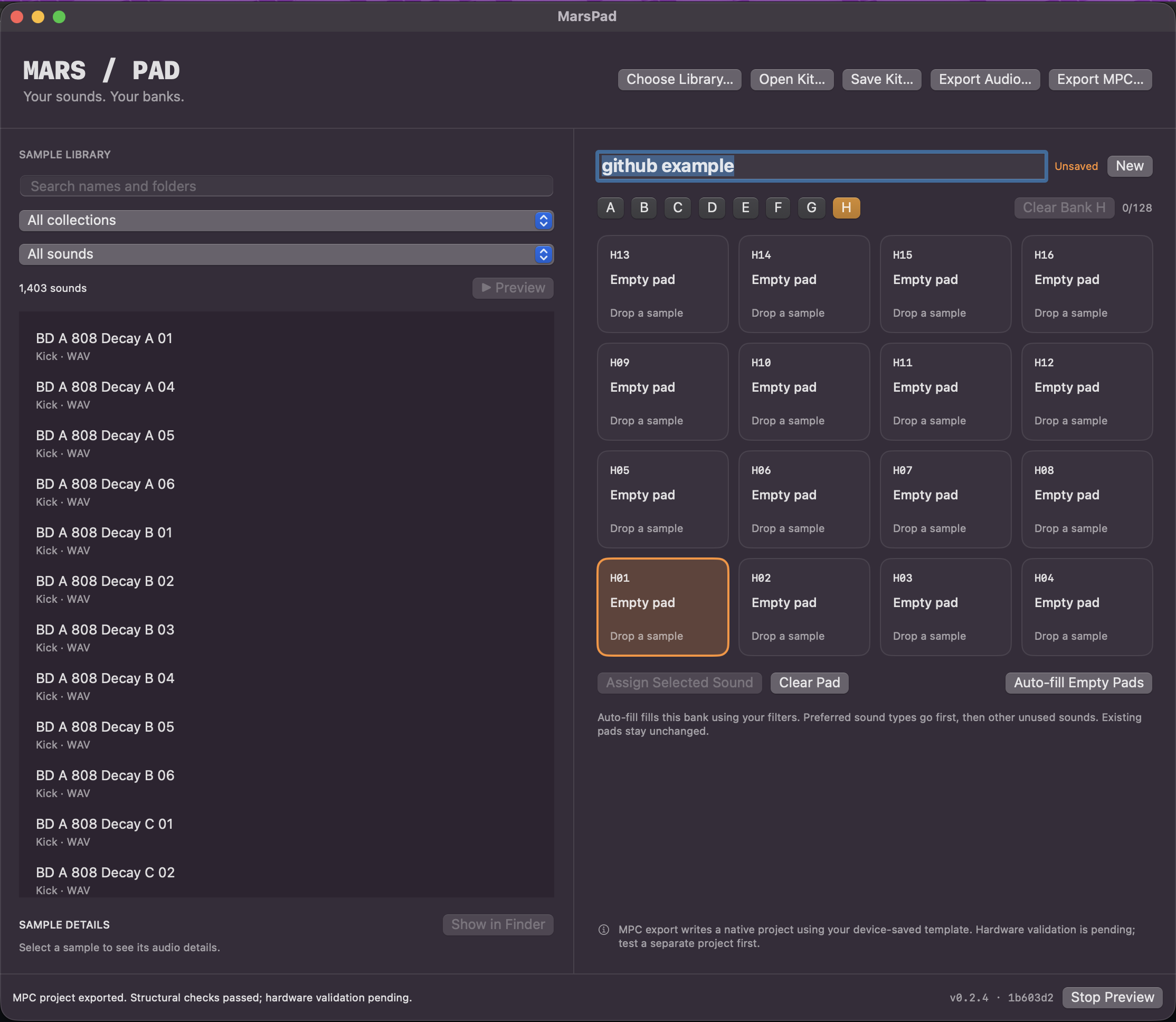
Use All collections and All sounds to browse the selected library. The sample list is on the left; the selected bank's 16 pads are on the right.
3. Narrow the collection
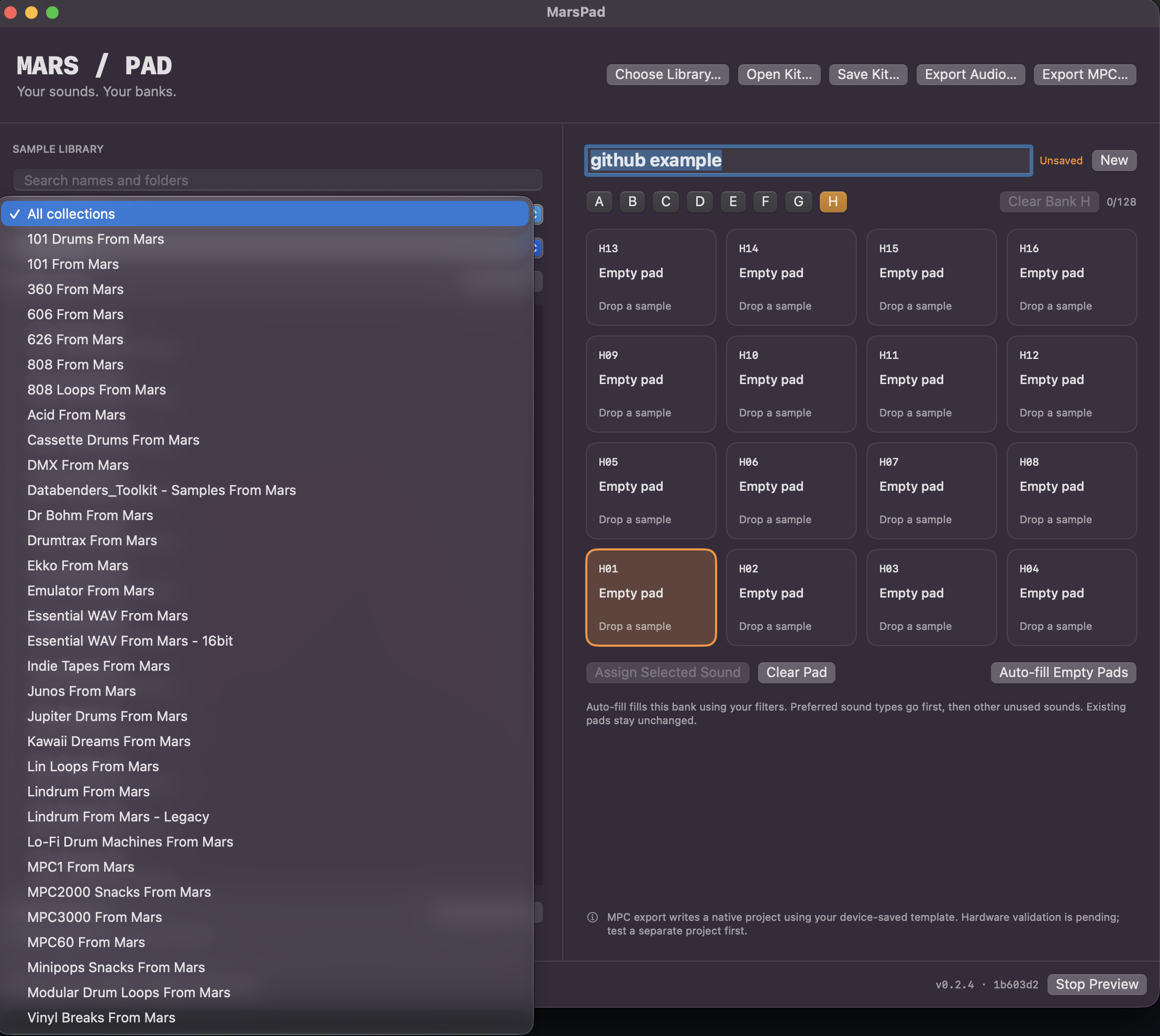
Open the collection menu to focus on one pack or instrument collection, or keep All collections selected to browse across the library.
4. Filter by sound type
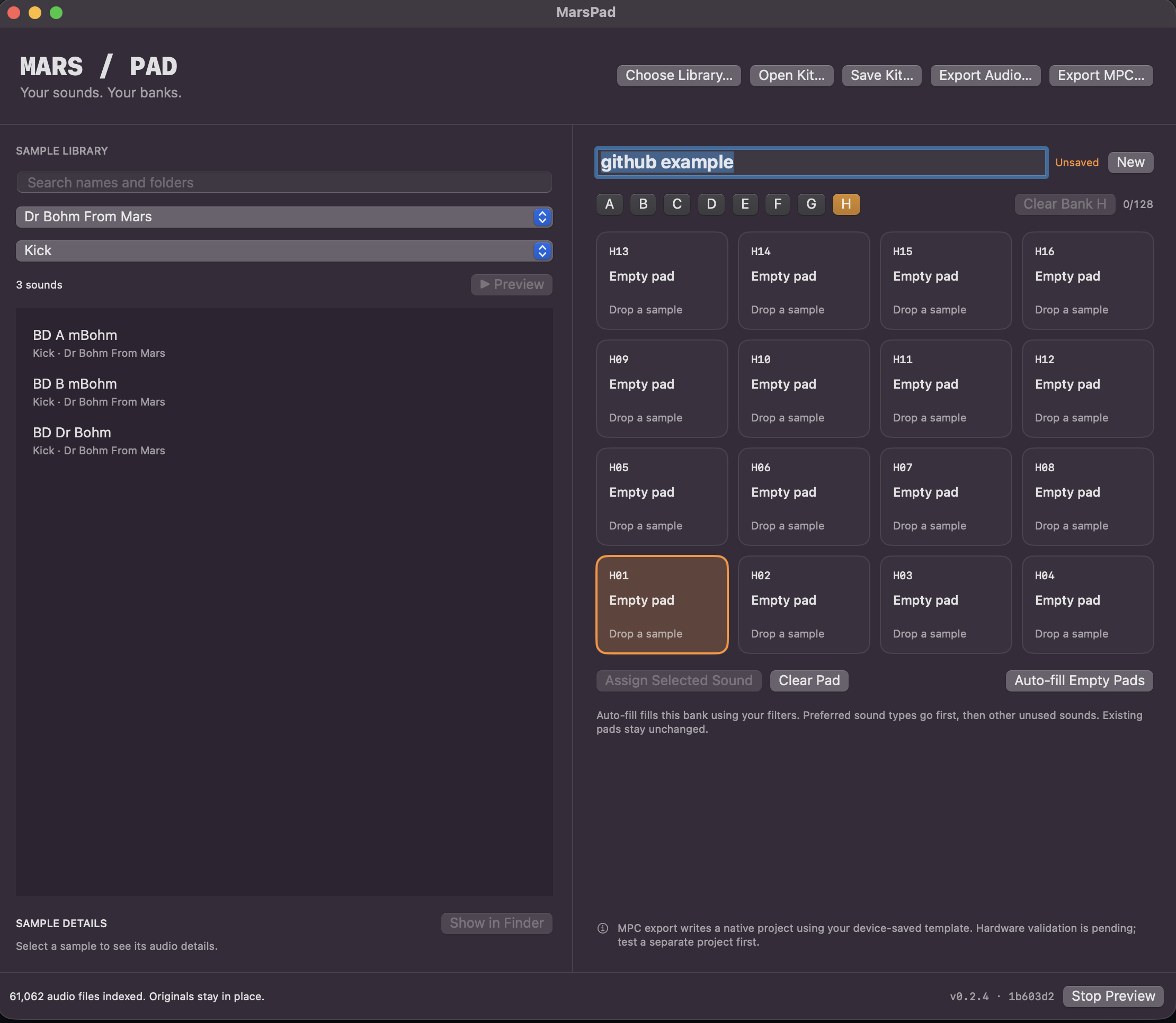
Combine collection and sound-type filters to narrow your choices—for example, Kick sounds from Dr Bohm From Mars. These filters also determine which sounds Auto-fill Empty Pads can choose.
Note to self: screenshots to capture someday
Documentation reminders for a future session. Use one consistently named demo kit throughout; these captures are optional follow-up work.
- Preview and details: select a sample with duration, bit rate, and Show in Finder visible.
- Manual assignment: show a named sound assigned to A01.
- Auto-fill: show a populated bank with the active filters visible.
- Bank switching: capture the same kit in banks A and B with different assignments.
- Clear Bank: capture before and after clearing one bank.
- Save/Open Kit: show saving a
.marspadfile and reopening it with assignments restored. - Optional custom template: show the Export MPC context menu and custom project chooser.
- Exported files: show the kit-named
.xpjbeside its matching audio folder. - SD placement: show both items directly inside
MPC-Sample/Projects. - Hardware result: photograph the matching assignments on the MPC Sample.
See the screenshot capture checklist for more detail.
Export to MPC Sample
- Save your kit plan, then choose Export MPC….
- A blank MPC Sample project is built in. No preparatory export from the device is needed. The supported format is AC50 / engine Sample / schema 28 / preamble 1.3.0.12.
- Choose a local destination. For a kit named
My Kit, the app writes a freshMy Kitfolder withMy Kit.xpj,My Kit_[ProjectData]/, a report, and notes. Existing exports remain intact: repeated exports useMy Kit-2,My Kit-3, and so on. Unsupported filename characters are replaced and long names limited. - Copy the
.xpjand its matching_[ProjectData]folder directly intoMPC-Sample/Projectson your microSD card, matching device-created projects. Do not copy the outer export folder. LeaveMPC-Sample/Samplesunchanged. Keep reports locally, and avoid replacing existing device projects. Safely eject the card before leaving SD Card Access mode. - Save your current MPC project, load the exported
.xpjvia the Project menu, and verify bank boundaries, full sample playback, and empty pads. This is the remaining hardware validation step; software checks cannot establish it.
Right-click Export MPC… to choose Use Custom MPC Template… if you want
settings from your own device-saved .xpj or ZIP. Custom templates need at least
one empty pad and must match the supported schema. The custom path is remembered;
Use Built-in Blank Project switches back to the default. Export snapshots the
kit so subsequent edits do not change an in-progress export.
The exporter has previously been tested on the user's hardware. The newly bundled blank project's first hardware load still needs confirmation; software tests cover its structure and all 128 assignments. See compatibility evidence.
Audio is streamed into 24-bit PCM WAVs, retaining source rate and channels. Mono/stereo at 44.1, 48, or 96 kHz and up to 20 minutes per sample are supported; other rates/channels or unreadable files fail with the affected pad identified. Sources are not normalized or changed. Export uses the template's empty-pad settings for every instrument, sets each sample's full inclusive end frame, clears old sample references, sequence events, song items and effects, and retains routing and other unknown schema defaults. It creates a clean kit, not a copy of the template's music. Other retained device/controller defaults still need a hardware check. Partial exports are removed on failure.
Build and run
Requires macOS 13+ and Apple Command Line Tools / Xcode with Swift 5.9+.
./build-app.sh
open "dist/MarsPad $(cat VERSION).app"
The build is locally ad-hoc signed; public distribution would require release
packaging, signing and notarization. Run swift test for model checks.
If XCTest is unavailable in Command Line Tools, run swift run MarsPad --self-test
for the built-in model checks. swift run MarsPad --preview-self-test exercises
rapid switching with generated silent audio, including a three-minute file.
The model checks also cover keyboard mappings, text-entry guards, grid boundaries,
legacy kit plans, exclusions and synthetic RTF reference/legend parsing.
Only the development Mac architecture is built by default. Windows/Linux are
future work; the SwiftUI interface would need replacement or a separate frontend.
Choose Library and select your extracted Samples from Mars folder. Select a sound to preview it, select a pad, then Assign Selected Sound, or drag it onto a pad. Auto-fill first places preferred categories, then fills remaining empty pads with other unused sounds matching the current filters. It keeps occupied pads and avoids reusing files assigned anywhere in the kit. If too few eligible sounds remain, the status explains why some pads are empty. Category inference favors filename tokens and nearby sound folders; ambiguous names appear under Other. Explicit filename sound types are not overridden by unrelated ancestor-folder names. Clear a pad using its context menu. Clear Bank A–H removes every assignment in the selected bank while keeping the other banks unchanged. Save Kit before quitting; there is no autosave. Saved kits are machine-local plans; moving sample folders breaks their references.
Native format investigation
python3 tools/inspect_project.py /path/to/project.zip performs a read-only archive
integrity and sample-reference check, printing inferred assignments. It does not
extract files, execute project content, or generate device projects.
python3 tools/test_native_export.py /path/to/MarsPad
checks the built-in project using generated audio. Append a read-only reference
ZIP path to check the optional custom-template workflow.
It covers all banks, sparse assignments, PCM payloads, sample lengths, missing
files, invalid templates, unsupported rates, and cleanup. No proprietary fixture
is committed. See COMPATIBILITY.md for evidence and limits.
Repository boundaries
Commit code and documentation only. Do not commit commercial audio, personal MPC projects, exported kits, local library indexes or absolute personal paths. A generated, content-free blank schema resource is bundled; no commercial audio or personal project is included. MIT applies to this application's code; it does not relicense any imported sample content.
Audio details and build identity
Select a library sound or populated pad to see duration, bit rate, PCM bit depth, sample rate and channel count beneath the library. Show in Finder reveals that file, including when metadata or preview fails. Its path is displayed and can be copied. Stopping playback keeps the inspected file available. Metadata failures show the underlying error; metadata and playback use separate readers, so a metadata failure alone does not establish that the audio cannot play or export. Header reads happen in the background; stale selections cannot overwrite the current details. Compressed durations are marked approximate, and unavailable properties are labeled. Bit rate is audio data per second (kb/s); bit depth is shown separately for PCM.
The footer shows the version from VERSION and the Git commit embedded when
packaged. Builds from modified source have a -dirty suffix. Direct swift run
launches show development/unpackaged rather than claiming a release identity.
An existing binary can be packaged with ./build-app.sh /absolute/path/to/MarsPad;
use a binary built from the current checkout so the embedded identity is accurate.
Native exports preserve original sample names in pad layers and sample inventories.
WAV filenames use A01_original-name.wav with filesystem-safe characters and a
length limit. If sample names repeat (including case variants), pad suffixes such
as Kick [A01] keep native sample identities distinct. Original names are always
retained in the export report. Hardware display behavior remains unvalidated.