MPC Sample Kit Load Addin
Loads a kit into selected MPC Sample banks while keeping the other banks intact. Requires Draw Handler 1.1.1 or later.
Screenshots (2)
Images: from jacob-sabella/mpc-addin-sample-kitload
About
mpc-addin-sample-kitload
An addin for the MPC Sample that loads a kit bank by bank. Stock Load Kit replaces the whole drum program and clears the sample pool, so every bank comes from the kit. With this addin, B3 Load Kit first opens the KITLOAD page, where you put the kit's banks onto the banks you choose. Only those banks change. Every other pad keeps its sample and its settings.
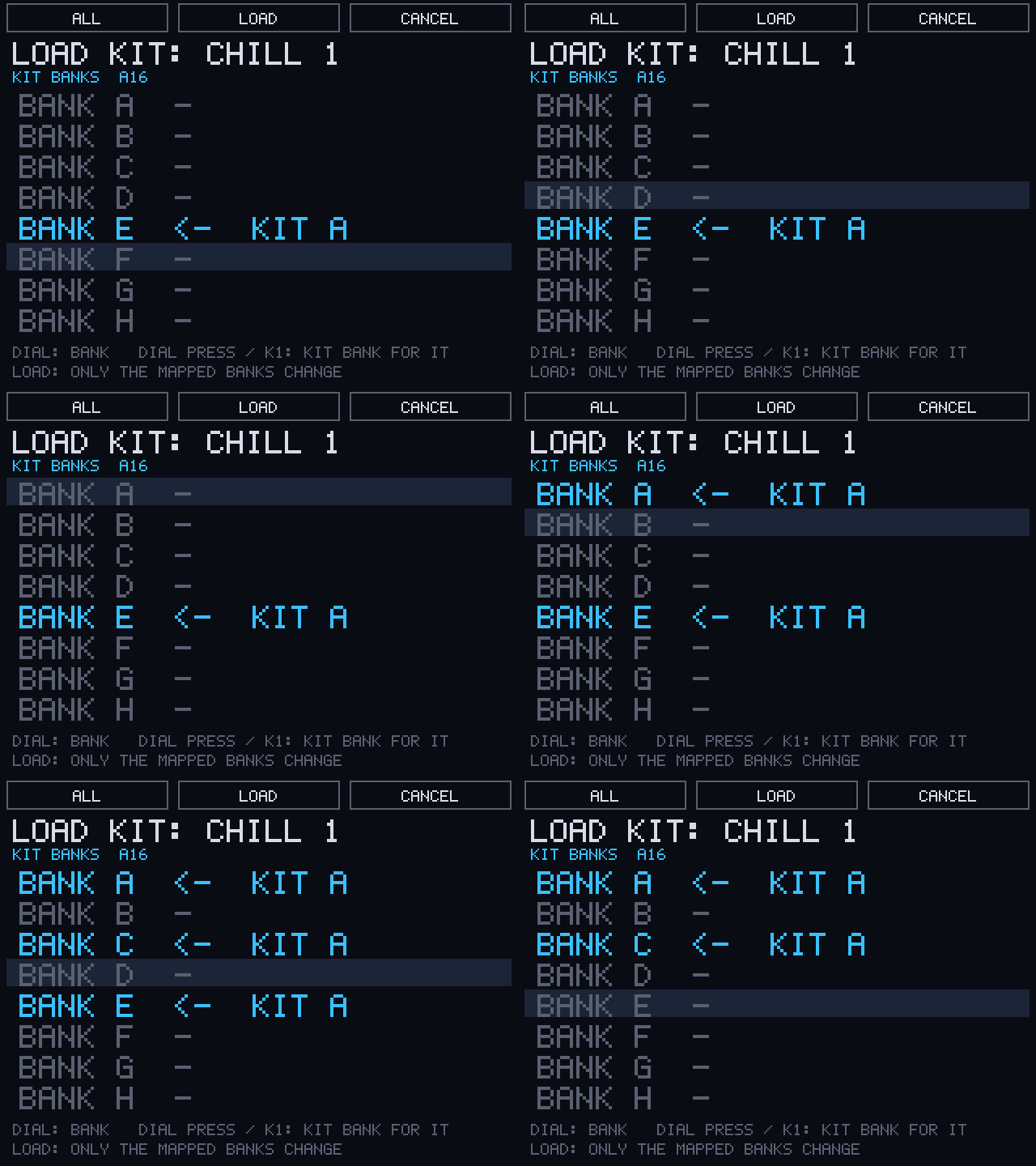
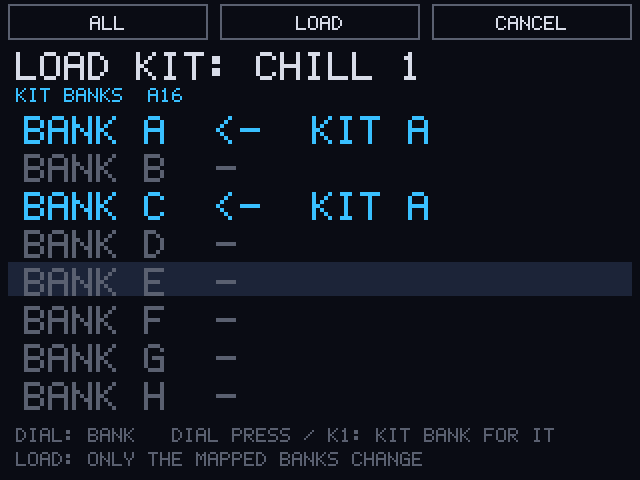
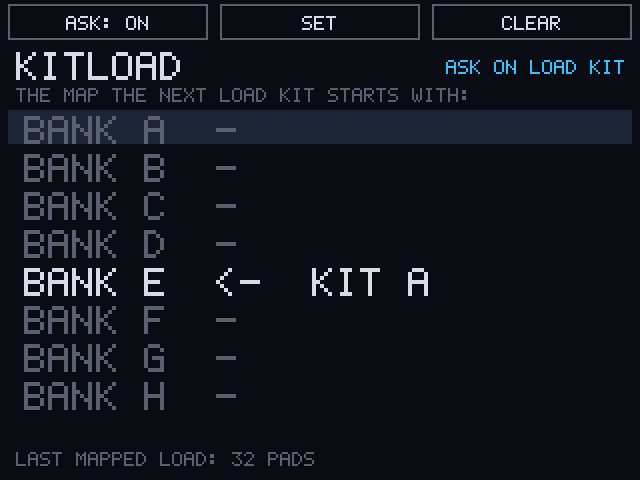
Captured on an MPC Sample with the draw handler's /snap.
Using it
Pick a kit in Load Project and press B3 Load Kit. The page shows the kit's name, the banks it fills (KIT BANKS A16 B16)
and one row per bank of your project. Turn the dial to pick a row; a dial press (or K1) steps the kit bank that goes
there, and - leaves the bank alone. Then press one of B1 to B3, along the top of the screen:
- ALL loads the whole kit, exactly as MPC does without the addin.
- LOAD changes only the mapped banks. The sample pool isn't cleared, so your other pads keep their samples.
- CANCEL loads nothing, and its undo does nothing either. Holding PAD FX while the page is up cancels too.
The next Load Kit starts with the map you last loaded with. Undo and redo are MPC's own: undo puts the whole drum program back as it was before the load, and redo repeats the same mapped load.
When no kit is waiting, KITLOAD opens from RACK's page list (mpc-addin-sample-rack) as a settings view. ASK ON/OFF turns the page off (Load Kit then works as stock), and SET and CLEAR edit the map the next Load Kit starts with.
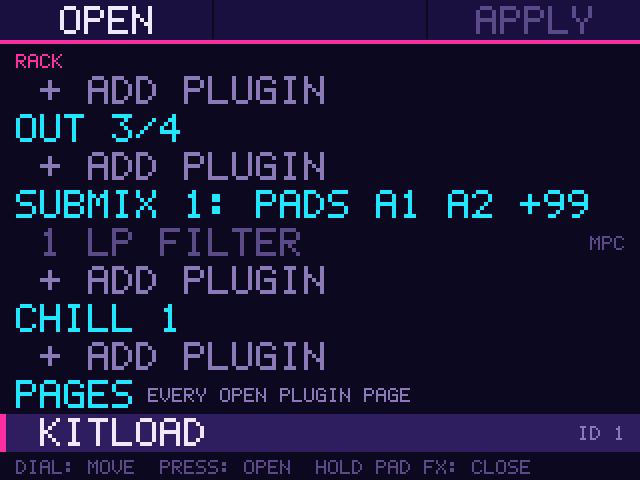
Limits
It only runs on MPC Sample firmware 1.4.0. The addin checks every address it patches before it patches anything; on
any other firmware it stays off and Load Kit is unchanged. Program-wide settings (the drum program's own values, not the
pads') still come from the kit, as they do with stock Load Kit. After a mapped load, samples that no pad uses any more
stay in the pool until you purge it. A kit is whatever MPC's Load Kit loads: an MPC Sample project (.xpj).
It needs mpc-addin-sample-draw-handler 1.1.1 or later for the page.
How it works
MPC preloads the addin (LD_PRELOAD), and the addin hooks Load Kit's own commands (src/hooks.c).
LoadProjectAsKitCommand::execute waits on MPC's main thread while the page asks; the buttons still reach the page
through the draw handler. If the page can't get the screen, or loses it before you answer, that Load Kit is cancelled
so MPC never sits waiting. For LOAD, the addin skips the sample-pool clear, and the drum import gives each mapped pad the
pad at the same position in its kit bank. Every other pad is copied back from the program the load replaced (MPC keeps
it for undo) through MPC's own pad export and import.
Settings
mpc_sample_kitload.conf, next to the library, which the page writes: ask (1: B3 stops at the page, 0: Load Kit as
MPC does it) and map (KITBANK:PROJECTBANK,..., e.g. A:C,B:D).
Install
Install mpc-addin-sample-draw-handler first. Download the zip from the
releases, copy the unpacked folder to the device and
run sh install.sh in it. The installer is the shared one from mpc-vst-plugins (tools/release/addin).
Develop
build-aarch64.sh builds build/aarch64/mpc_sample_kitload.so with the aarch64 cross compiler, or in an arm64
container without one. tools/release-aarch64.sh <version> packages the release zip. src/sample_draw.h is the draw
handler's client header, the same copy mpc-addin-sample-rack uses.
License
MIT.
Recent releases
-
Release notes
MPC Sample kit load addin 1.0.0
Load Kit on the MPC Sample, bank by bank: put a kit's banks onto the banks you choose and keep the rest of your pads.
An addin for MPC OS standalone devices: a library MPC loads at its start (through
LD_PRELOAD), not a plugin on a track. It is installed to/data/mpc-addins/sample-kitload/.Requirements
- A Gen2 MPC OS standalone device (aarch64: Live III, One G2, Key(s) G2). The installer refuses anything else.
- Root shell access (SSH) to the device. Stock MPC OS doesn't offer this; you need a modded unit.
- MPC Sample firmware 1.4.0 (on any other firmware it stays off and Load Kit is unchanged)
- Installing addins this way is unofficial: back up first, use at your own risk.
Install
- Unzip, then copy the whole folder to the device, e.g.
scp -r MPC-Sample-kit-load-addin-1.0.0 root@<device-ip>:/tmp/ - Run it:
ssh root@<device-ip> sh /tmp/MPC-Sample-kit-load-addin-1.0.0/install.sh
The installer copies the addin into
/data/mpc-addins/sample-kitload/, addsmpc_sample_kitload.soto theLD_PRELOADlist of MPC's service and restarts MPC (save your project first). The list is extended, never replaced: other addins and the libraries the firmware preloads stay. Where no writable file sets the list (the unit is on the read-only root), one drop-in shared by every addin sets it,/etc/systemd/system/<service>.service.d/90-mpc-addins.conf. Re-run the installer after a firmware update.-yskips the question,-nleaves the restart to you.Settings are in
/data/mpc-addins/sample-kitload/mpc_sample_kitload.conf; an upgrade keeps your edits.B3 Load Kit now shows the KITLOAD page: map kit banks onto your banks and press LOAD to change only those, ALL for the whole kit as before, or CANCEL. ASK OFF (the page, from RACK's page list) turns it off. MPC Sample firmware 1.4.0 only.
Uninstall
ssh root@<device-ip> sh /data/mpc-addins/sample-kitload/uninstall.shtakes the addin out ofLD_PRELOAD, restarts MPC and deletes its folder.Files
See
SHA256SUMS. Made with mpc-vst-plugins (docs/ADDINS.md).What it does
B3 Load Kit shows the KITLOAD page before anything loads: the kit's name, the banks it fills, and one row per bank of your project. Put the kit's banks onto the banks you choose (dial: row, dial press or K1: kit bank,
-keeps the bank), then B1-B3:- ALL loads the whole kit, as MPC does without the addin.
- LOAD changes only the mapped banks. The sample pool isn't cleared and every other pad keeps its sample and settings.
- CANCEL loads nothing.
Undo puts the drum program back as it was; redo repeats the same load. ASK OFF (the settings view, from RACK's page list) turns the page off. MPC Sample firmware 1.4.0 only: on any other firmware the addin stays off and Load Kit is unchanged. Needs mpc-addin-sample-draw-handler 1.1.1 or later.
Built from jacob-sabella/mpc-addin-sample-kitload@00fd3a6 with mpc-vst-plugins (tools/release-aarch64.sh). Running on an MPC Sample (firmware 1.4.0.8) since 2026-11-25.