Melodee
A 16-track MPC Sample groovebox with drum kits, sampled instruments, VST instruments and effects, MIDI tracks, patterns, scenes and song arrangement.
Screenshots (3)
Images: from keremimo/melodee-sample
About

A 16-track groovebox for the Akai MPC Sample
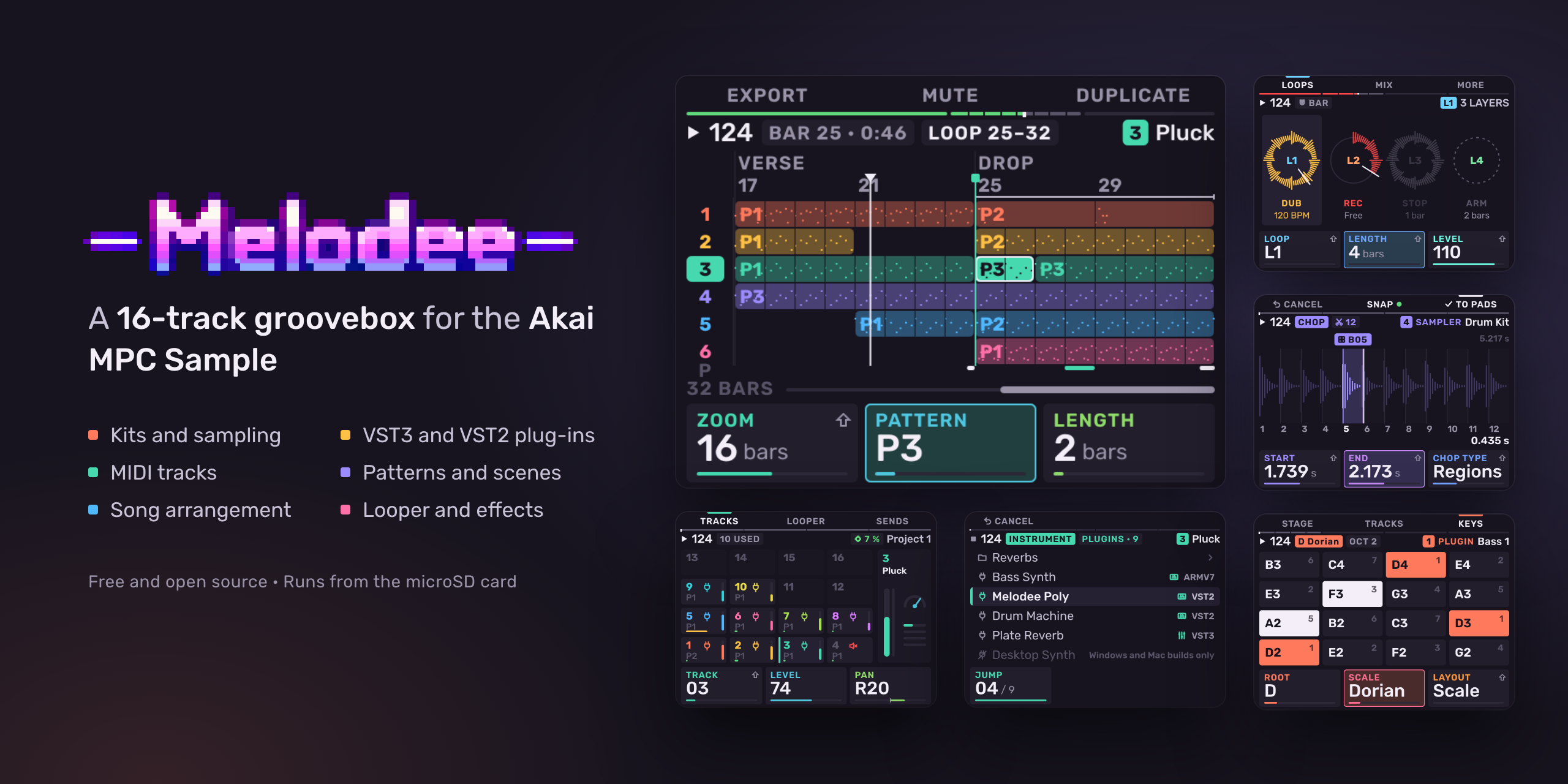
Melodee is a 16-track groovebox for the Akai MPC Sample. It runs on the MPC in place of the stock app, started from the microSD card. Each pad is a track: a drum kit, a keygroup (a sampled instrument), a plug-in instrument, a MIDI track for external gear, or an audio track. Tracks play patterns, patterns make sequences and a song, and every track has a mixer strip and an effect chain that takes plug-in effects.
Melodee does not change anything on the MPC itself. It runs from files on
the card. Choose MPC APP on its Exit screen, or remove its autorun
folder from the card, and the stock app runs as before.
Back up your card before you install Melodee.
New to Melodee? Start with the quickstart. For every page and control, read the user guide.
Features
- 16 tracks, one per pad. Hold PAD BANK and press a pad to select a track from any page.
- VST3, LV2, CLAP and VST2 plug-in host: load instruments and effects from the card. Use a plug-in instrument as a track's sound, and plug-in effects on track, bus, master and loop chains. Melodee runs 64-bit ARM Linux builds, Open MPC plug-ins, and 32-bit ARM plug-ins through a bridge. It loads each plug-in's presets, keeps its state in the project, plays drum machine plug-ins on pads, and compensates for plug-in latency.
- Melodee synths: three Open MPC instruments of its own, Melodee Poly (analog-style polysynth), Melodee PD (phase distortion) and Melodee Chip (chip voice), each with factory presets.
- Kits of 128 pads in 8 banks, with the stock Sample mode pages (Trim, Mix, Amp Env, Tune, Play, Filter, Filt Env) plus Layers, Follow (tempo follow), Cloud (granular) and a kit filter. Each pad has its own effects and sends to the four buses.
- Sampling: Chop (by hits, regions, beats, or by hand as the sample plays, up to 64 slices), Sample Record, Audio Recall, Resample and 16 Levels. Samples load from WAV, MP3, FLAC, Ogg Vorbis and AIFF files. A sample longer than 10 seconds plays from the card, up to 6 hours; a project holds as many samples as fit in memory.
- Stems: separate a pad's sample into drums, bass, music and vocals on four new pads, on the MPC itself.
- Sampled instruments: SFZ, MPC keygroup and drum programs (
.xpm,.xty), MPC expansions (.xpn), Logic EXS24 (.exs), SoundFont (.sf2) and DecentSampler (.dspreset), streamed from the card, on a keygroup track or a kit pad. Stock MPC Sample projects (.xpj) open too. - Auto sampler: samples a plug-in track, or an external instrument on a MIDI track, into an MPC keygroup program on a new keygroup track.
- Audio tracks: record the input into a pattern, as on the MPC 3. Each take has its level, start and end, fades, reverse and warp.
- MIDI tracks for external synths and drum machines over USB-C or the MIDI jacks, with program changes, CC knobs and SysEx.
- Chords: MPC 3 chord progressions on the pads, on any track, and a chord builder for your own.
- Sequencing: 128 patterns per track in 8 banks, up to 128 bars each. Step sequencer, piano roll, step entry, parameter locks, ratchets and trig conditions. Sequences, as on the stock app, sequence chains and follow actions.
- Song: an arrangement with a lane per track, markers and a tempo lane. Export a WAV mixdown, stems, a MIDI file or an MPC 3 project.
- Looper: four loops that follow the tempo, with overdub and undo.
- Effects: 41 effects. A six-slot chain on every track, four send buses and the master. Knob FX, Pad FX, Flex Beat and the master compressor work as on the stock app.
- Freeze: print a track to audio and play it from the card, or deep freeze it to unload its plug-ins too.
- Sync: MIDI clock and MTC in and out, and CV clock out.
- The Menu: hold the encoder on any page for the page's jobs with their shortcuts, and the 16 places laid out as the pads. Four short lessons run on the MPC itself.
- Basic and Full: Basic shows the stock app's pages plus tracks, plug-ins, the mixer and Song. Full shows every page. Melodee starts on Full.
- Web page: connect the MPC to a computer by USB-C and open http://melodee.local to install updates and plug-ins, manage the card's files and read this guide. The MPC can also show up as a USB webcam with Melodee's screen.
- Updates from the card: copy a release zip to the card and Melodee installs it.
Requirements
- Akai MPC Sample with firmware 1.3.0.12. On any other firmware Melodee does not start and the stock app keeps running.
- A microSD card.
Install
- Download the latest
Melodee-MPC-Sample-<version>.zipfrom Releases. - Back up the card. If the card already has an
autorunfolder at its top level, move it somewhere safe. - Unzip it. The zip holds one folder,
autorun. Copy that folder to the top level of the card. Do not edit or rename anything inside it. - Put the card in the MPC and switch it on. The stock app starts first. A few seconds later Melodee starts.
The quickstart has the full steps, with screenshots.
Plug-ins
Put plug-ins in Melodee/Plugins on the card (the Plugins folder inside
the Melodee folder at the top level), in any subfolders. Melodee loads:
- VST3 bundles with a
Contents/aarch64-linux/build - LV2 bundles (
.lv2folders) built for 64-bit ARM Linux (aarch64) - CLAP plug-ins (
.clapfiles) built for 64-bit ARM Linux (aarch64) - Open MPC plug-in folders
- VST2
.sofiles built for 64-bit ARM (aarch64) or 32-bit ARM (armv7)
Plug-ins built only for Windows or macOS do not run on the MPC. The plug-in picker shows them dimmed, with the reason.
The Melodee synths are free downloads:
Melodee Poly, Melodee PD and
Melodee Chip. From each release, download the
-mpc-sample.zip, unzip it and copy the plug-in folder inside (for example
Ellic Studio - VST - Melodee Poly) into Melodee/Plugins. The synths also run on
MPC OS devices that load Open MPC plug-ins; those devices use the
-mpc-aarch64.zip or -mpc-armv7.zip.
Documentation
| Document | What it covers |
|---|---|
| Quickstart | Install, first start, a first beat, saving |
| User guide | Every page and control, and a chapter for users of the stock app |
| Reference | The complete control reference, file formats and internals |
The design notes for the Looper and MIDI tracks record the choices made while each was built. They are for developers; the user guide covers both.
Build from source
Melodee is built for linux/arm64 in a Docker image. You need Docker and Python 3.
git clone --recurse-submodules https://github.com/keremimo/melodee-sample.git
cd melodee-sample
./build.sh
./build.sh builds build/melodee, then runs the tests, a sound
self-test, a monkey test and the page previews (build/melodee-preview/).
| Path | Contents |
|---|---|
src/melodee/ |
The app: model, engines, pages, shell, design system |
src/main.cpp |
Connects Melodee to the sample-base runtime |
base/ |
sample-base (git submodule): drivers, runtime, build, install scripts |
tests/ |
Engine, sequencer and shell tests, layout and release checks |
tools/make_release.py, release/ |
The SD card release zip |
To run a build on an MPC over SSH, use device.py (the base's device tool):
python3 device.py start
start copies Melodee into RAM and starts it. status, ctl and
screenshot talk to the running app. install-sd starts it from the card at
every boot.
To make a release zip from a committed tree:
./release.sh v0.3.0
This writes dist/Melodee-MPC-Sample-<version>.zip.
To move the base to its latest commit:
git -C base pull origin main
git add base
Support
Melodee is free. If you use it, you can support it on Ko-fi.
Credits and licence
Melodee is made by Kerem Kiliç (Ellic Studio).
Melodee is licensed under AGPL-3.0-only (LICENSE). It uses JUCE under the AGPLv3, and the Rubik typeface and the other screen fonts under the SIL Open Font License 1.1 (THIRD_PARTY.md). The boot animation's logo and backdrop are not covered by the AGPL.
Melodee is not affiliated with or endorsed by inMusic or Akai Professional. MPC and MPC Sample are trademarks of inMusic Brands.
Recent releases
-
Release notes
Melodee 0.5.1 for the Akai MPC Sample: a 16-track groovebox that runs on the MPC in place of the stock app, from the microSD card.
Update
- From 0.2.x to 0.5.0: copy
Melodee-MPC-Sample-v0.5.1.zipto the card, or send it from the web page at http://melodee.local. Melodee asks Update to v0.5.1?, saves, installs and restarts. - From 0.1.0 or a new card: install by hand as in Install: unzip and copy the
autorunfolder to the top level of the card.
Requires an MPC Sample on firmware 1.3.0.12.
Back up
Melodee/Projectsbefore you update.Changed: read this first
- Hold SEQ for the selected track's patterns. On any page, a pad launches that pattern on the selected track only, and more pads in the same hold chain them. SHIFT + pad launches a sequence on every track. While SHIFT is held, the pads and the sheet show the sequences, and SHIFT + more pads chain them. − / + launch the previous / next pattern. A tap of SEQ still opens Sequences.
- Auto chop cuts DRUMS and MUSIC on the beats. A sample with a steady beat is cut on the beats Melodee finds in it: every 1, 2, 4, 8 or 16 beats, or eighths, whichever comes nearest SLICES. No slice is shorter than 80 % of an eighth note, and Auto keeps its cuts that far from your hand cuts. HITS keeps 150 ms between cuts.
New
Chop
- TO PADS writes a pattern of the slices. With the PATTERN card on (the default), TO PADS also writes a pattern with a note for each slice where it falls, so PLAY gives you the loop back on pads you can change. With KIT, each note plays the pad of its sound. The pattern goes into the track's pattern when that is empty, else into the first empty one. Undo takes back the pads and the pattern in one step.
Settings
- USB volume on AUDIO: what a computer records from the MPC over USB-C. Full (the default) sends the mix at full level whatever MAIN VOLUME is set to. Knob follows MAIN VOLUME, as the jacks do.
Fixed
- While a loop or MIDI track uses the mic or the rear inputs, the other input as Input Config's or an audio track's source shows IN USE and is silent, instead of playing the input in use under its name. Sample Record and audio takes refuse with a notice.
- From 0.2.x to 0.5.0: copy
-
Release notes
Melodee 0.5.0 for the Akai MPC Sample: a 16-track groovebox that runs on the MPC in place of the stock app, from the microSD card.
Update
- From 0.2.x, 0.3.0 or 0.4.0: copy
Melodee-MPC-Sample-v0.5.0.zipto the card, or send it from the web page at http://melodee.local. Melodee asks Update to v0.5.0?, saves, installs and restarts. - From 0.1.0 or a new card: install by hand as in Install: unzip and copy the
autorunfolder to the top level of the card.
Requires an MPC Sample on firmware 1.3.0.12.
Back up
Melodee/Projectsbefore you update.Changed: read this first
- Settings and MIDI Config rows are set with K1. The encoder picks a row, K1 sets it (its card shows the value), − / + step it. Push no longer opens a value. Sample rate, Audio buffer and Screen Mirror wait until K1 rests before the device reopens.
- Chop opens on the type you picked last. A sample with no slices opens on the last K3 type, kept with the settings.
New
Sequencing
- Free pattern length. An empty pattern is Free: K1 shows Free. The first Seq Record take grows it a bar at a time and ends at the bar line when you press SEQ RECORD or STOP. With notes on other tracks in its sequence, the take gets their length. Up to 128 bars.
- Step Edit: a new bar past the end. The cursor walks past the last step into a new bar, marked by a + and an arrow at the right edge. A step written there makes the pattern long enough to hold it, to the end of its bar. Left empty, nothing changes.
Chop
Auto chop type (K3). Melodee reads the sample as DRUMS, MUSIC, SHOTS or HITS, shown at the top right, and cuts to suit:
- DRUMS: one slice a drum hit. Ghost notes and flams stay with the hit before.
- MUSIC: where the chords change.
- SHOTS: one slice a sound between silences.
- HITS: the strongest hits, spread out.
SHIFT + K3 sets SLICES, 8 to 64.
B2 (CLEAN) on Auto separates the sample's stems once and cuts on the DRUMS stem.
TO PADS has a fourth card, KIT: one pad a sound, kicks first. Slices that sound the same share one pad (the longest one) and the hats share a mute group.
Auto sampler
- Up to 8 velocity layers: LAYERS Auto or 1–8. Auto splits where the tone changes; the sheet shows the layers as VEL bars. The .xpm keeps 4 layers for MPC 2, and the keygroup track plays all of them from the .xty.
- A WAV is written mono when both sides are the same.
- TIME shows about how long sampling takes, before you press SAMPLE.
- STEP goes up to 24 semitones, HOLD up to 20 s.
Plug-ins
- Replacing a plug-in on a track is one undo step. Undo loads the old plug-in with its state; redo brings back the new one.
Settings
- USAGE LOG (K2 on the Settings doors, off at first). While on, Melodee writes pages opened, presses and turns that changed nothing, undo soon after an edit, MENU picks and lesson steps to
Melodee/Usage. No project, sample or plug-in names.
Fixed
- Recall fills the pattern a track plays when that pattern is empty, so a jam in a new project lands in P1, not P2.
- Auto sample on a MIDI track no longer shows the SPEED readout: an outside instrument plays in real time.
- From 0.2.x, 0.3.0 or 0.4.0: copy
-
Release notes
Melodee 0.4.0 for the Akai MPC Sample: a 16-track groovebox that runs on the MPC in place of the stock app, from the microSD card.
Update
- From 0.2.x or 0.3.0: copy
Melodee-MPC-Sample-v0.4.0.zipto the card, or send it from the web page at http://melodee.local. Melodee asks Update to v0.4.0?, saves, installs and restarts. - From 0.1.0 or a new card: install by hand as in Install: unzip and copy the
autorunfolder to the top level of the card.
Requires an MPC Sample on firmware 1.3.0.12.
Back up
Melodee/Projectsbefore you update.Changed: read this first
- Chop is reworked. See Chop below. The encoder now moves the selected slice's cut instead of selecting a slice: tap a slice's pad or use − / + to select one. Push no longer starts a Manual take. B2 (SNAP) is gone: every cut always lands on a zero crossing.
- Rec Quantize is one press. SHIFT + Pad 10 turns it on or off, as on the MPC. Recorded notes land on the pattern's Q. The REC QUANTIZE page and Settings' Rec grid row are gone.
- A new project has no tracks. The track types open on track 1. On the NEW question, B2 (KIT) starts with the MPC's factory kit on track 1.
- Melodee starts on Full, also after an update. Basic offers every track type.
- Nothing is written to the card's top level. New samples go to
Melodee/Samplesand.syxfiles are read fromMelodee/SysEx. The oldSamplesandSysExfolders at the top are still read. - Push on an MPC drum program in the sample browser opens LOAD KIT instead of replacing the kit at once (see below).
- ERASE + an empty pad on a kit now closes the gap (see below).
- The meter lights step as the stock app's: −24.1, −12.1, −6.1 and −3.1 dBFS, red past −0.1 dBFS.
- The manual is updated for all of this, on GitHub and on the web page at http://melodee.local.
New
Chop
- Manual take with the red pad. Set K3 to Manual. Pad 1 blinks red: tap it and the region plays. The red moves to the next pad; tap it on the next hit to cut there. After pad 16 the pads turn to bank B, up to 64 slices in banks A–D. Tap a lit pad to play again from its slice and redo the cuts after it. A take is one undo step.
- Fix a cut by eye. Tap a slice's pad and turn the encoder: its start moves (its end after K2). The view zooms in while you turn and the slice plays once when you stop. SHIFT + encoder jumps the cut from hit to hit, marked under the waveform.
- PAD BANK steps the pads through the slices, 16 at a time.
- Beats chop by division: 1/16, 1/8, 1/4, 1/2, 1, 2 or 4 bars on SHIFT + K3.
- Cuts you make or move by hand stay when you chop again by type, threshold, division or regions. An automatic cut close to one of yours gives way to it, so no short slivers.
- ERASE + pad joins a slice with the one before. On pad 1 it joins with the next. The pads after move down one. ERASE + CHOP takes every cut out.
- TO PADS asks how the slices play: POLY, MONO (one mute group) or THRU (each plays on to the region's end).
- The chop type, its amount and your hand cuts are saved in the sample's WAV file with its slices, so they are still there after a restart.
Kits
- LOAD KIT. Push on an MPC drum program in the sample browser shows its filled banks and how many pads each has. Pick which of your kit's banks each one fills, or WHOLE KIT. Only the filled pads are loaded; the rest of your kit stays. One undo.
- Close a gap. ERASE + an empty pad moves the pads after it down one, with their notes, through that bank and the next one. To take a pad out and close the gap, press ERASE + that pad twice. The notices say what happened.
Samples
- A sample's note is found when it loads or is recorded. 16 Levels Scale and Chords, MIDI into 16 Levels, Roll's row names and a keygroup track of one sample play from that note instead of C. A chord stab's root is found from its chord.
- Stems BEST (B2): separates up to 16 kHz in two passes, about three times as long. On at first, kept with the settings.
- The sample browser's PREVIEW works on a keygroup track too, and stays on or off after a restart.
Sequencing
- Roll: K2 on marked notes moves their velocities together.
Fixed
- A kept punch ends with its pattern, also with Half Seq, a shorter length, Half Speed or an editor's loop. Punches let go when the transport leaves them.
- Motion and kept punches past a pattern's end stay out on a track at another speed.
- A kit lane of its own length keeps its notes with Seq Record, Note Repeat and Time Correct.
- Stopping before the bar a launched sequence waits for brings its tempo with it.
- The song's clips play their pattern where the song is.
- A track move takes its kept punches and its modulator and macro lanes with it.
- An editor's loop plays the right bars on a track at another speed.
- Clear pattern takes the pattern's Motion with its notes.
- SHIFT + PLAY continues from the right place on a track at another speed.
- A MIDI track's audio no longer clicks on each pad touch and release.
- The auto sampler no longer hears an outside instrument's check notes ringing.
- From 0.2.x or 0.3.0: copy