SampleBoot
A boot selector for the MPC Sample. Keep the stock firmware and any number of custom OSes on one SD card, then pick which one starts with the encoder at power-on.
Screenshots (5)
Images: from pxcm/SampleBoot
About

A boot selector for the Akai MPC Sample
sampleboot.com · Download · Theme editor online · Roadmap · Support on Ko-fi
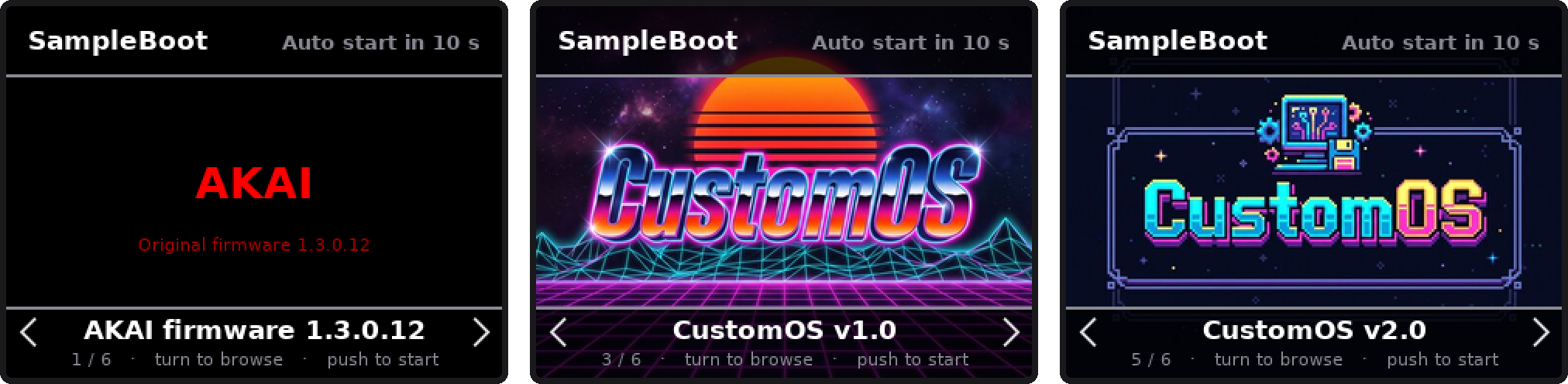
SampleBoot is a boot menu for the Akai MPC Sample. Custom OSes for the MPC
Sample, such as Melodee,
SampQOL OS and
MPC Simple, start from an autorun
folder on the SD card, and a card holds only one of them. To change OS you had
to swap SD cards, or move autorun folders around on a computer, and your
projects ended up spread over several cards.
With SampleBoot, one SD card holds them all: the stock firmware, every custom OS and as many versions of each as you like. When the MPC starts, turn the encoder, push it, and the system you chose starts. Your projects and samples stay on the same card.
- It starts from the SD card. It does not change the stock firmware.
- Without the card, or with its
autorunfolder renamed, the MPC starts as stock. - The stock Akai app is always one of the choices.
- Tested on the MPC Sample with firmware 1.3.0 (full version number 1.3.0.12). See Works with for the systems known to work.
- SampleBoot includes no OS: you download each one from its own project.
Features
Boot menu
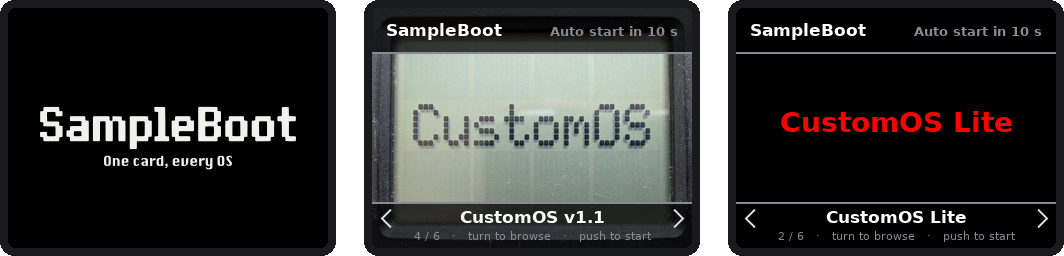
- A splash screen at power-on, drawn line by line as on an old screen: dark, light, your own image, or off.
- A full-screen carousel: turn the encoder to browse, push it to start.
- Every system shows its own image, or a title screen with its name.
- Starts the system on screen by itself after 10 seconds (20 once you browse), with beeps in the last 5 seconds that follow the Main Volume knob. The last choice comes first next time.
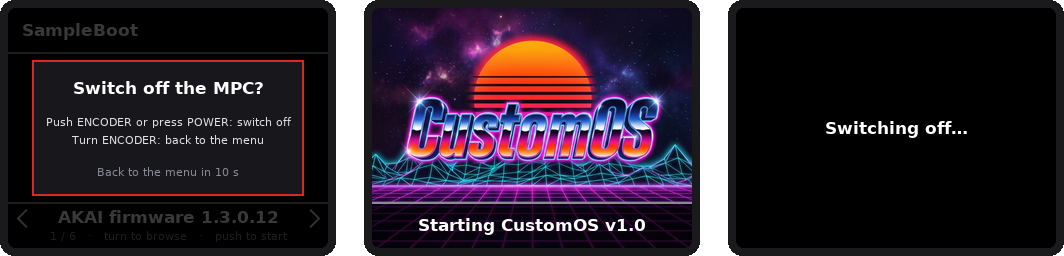
- Press POWER in the menu to switch the MPC off.
- The pad and button lights left on by the previous app are switched off.
One card, many systems
- Add an OS by copying its
autorunfolder intoautorun/mods/. No tools, no computer setup. - Keep several versions of the same OS and go back to an older one in a few seconds.
- Give each system a name and an image, or hide it without deleting it.
Safety
- If a system does not start within 60 seconds, the stock app starts instead.
- Every audio setting it touches is put back before the chosen system starts.
last-boot.logon the card tells what happened at the last boot, andboot-history.logkeeps the last 10 boots, each with its date.
Your look
- Every colour on screen can be changed in
sampleboot.conf. - The theme editor, a page that runs offline in your browser, previews every screen exactly as the MPC draws it and writes the file for you.
Works with
SampleBoot runs each system's own autorun folder, unchanged, so any OS that
starts from autorun should work. These are the ones known to work so far.
| System | Versions | Status | Checked by | Notes | From |
|---|---|---|---|---|---|
| Stock firmware | 1.3.0 (1.3.0.12) | Works | Tested | Akai Professional | |
| SampQOL OS | 0.1.4.7 – 0.3.0 | Works | Tested | 16 USB outputs: SampleBoot 1.0.1 or later | beatops.io/sampqol |
| Melodee | 0.1.0 – 0.3.0 | Works | Tested | Update it by replacing its folder | keremimo/melodee-sample |
| MPC Simple | 1.0 Beta 1 – Beta 3 | Works | Tested | mpcsimple.com | |
| MPCTRACKER | 0.1.0 | Works | Tested | Needs an empty sampleboot.inplace file in its folder (SampleBoot 1.0.2 or later) |
jeffwebb-to/mpc-sample-tracker |
| ODDFORM | 1.2.0 beta | Works | User report | – | |
| Rhythmer OS | 0.2.0 | Works | User report | Keep its Rhythmer and Samples folders at the card root |
jazzyrhythmer.github.io/mpc-sample |
Works with issues means it starts, but something doesn't work as it does without SampleBoot: the notes say what. Tested: on the author's MPC Sample. User report: a user confirmed it works. Using another system with SampleBoot? Open an issue with its name and version, and it goes on the list.
Requirements
- Akai MPC Sample with firmware 1.3.0 (1.3.0.12)
- An SD card, and a computer to copy files to it
- The custom OSes you want, downloaded from their own projects
- Optional: Python 3, for the helper script
Install
Back up your SD card first.
- Download
SampleBoot-1.0.2.zipfrom Releases and unzip it. - Copy its
autorunfolder to the top level of the SD card. If the card already has anautorunfolder from an OS, move that folder aside first: it becomes one of your systems in the next step. - For each OS, copy the
autorunfolder from its release intoautorun/mods/and rename it to the name you want in the menu. If the OS also comes with a folder for the top level of the card (MPC Simple'sMPC-Simple), copy that one to the top level, as its instructions say. - Put the card in the MPC and switch it on.
The card then looks like this:
autorun/
  autorun.sh  autorun.json  autorun.check   SampleBoot's launcher, do not edit
  sampleboot/                               SampleBoot itself and its settings
  mods/
    Melodee 0.3.0/       Melodee's "autorun" folder, renamed
    SampQOL 0.3.0/       SampQOL's "autorun" folder, renamed
To add, update or remove an OS later, copy, replace or delete its folder in
autorun/mods/. A folder whose name starts with _ is hidden from the menu.
Updating SampleBoot
Copy the new release's autorun folder over the old one. Your systems in
mods/ stay. Copying replaces sampleboot/sampleboot.conf too: if you changed
it, keep a copy and put it back.
Helper script (optional)
tools/add_mod.py (Python 3, nothing else needed) installs or updates
SampleBoot without touching your settings, and adds OSes straight from their
release zips, top-level folders included:
python3 tools/add_mod.py /Volumes/MPC ~/Downloads/Melodee-MPC-Sample-v0.3.0.zip
python3 tools/add_mod.py /Volumes/MPC some-os.zip --name "Some OS 1.0"
python3 tools/add_mod.py /Volumes/MPC              # install or update SampleBoot only
Using it
| Control | Action |
|---|---|
| Turn the encoder | Browse the systems |
| Push the encoder | Start the system on screen |
| No input for 10 s (20 s once you have browsed) | Start the system on screen |
| POWER | Ask whether to switch the MPC off: push the encoder or press POWER again to confirm, turn the encoder to go back |
SampleBoot appears a few seconds after power-on: the stock app starts first, then SampleBoot takes over the screen, as Melodee and SampQOL do. Its splash screen comes first; turn or push the encoder to skip it.

The countdown beeps come from the speaker, or only from the headphones or line out when something is plugged in. Their volume follows the Main Volume knob.
Names and images
- Name: the folder name, or the first line of a text file
sampleboot.txtin the folder. - Image:
sampleboot.png,sampleboot.jpgorsampleboot.bmpin the folder, any size; 320×240 looks best. Keep the top and bottom 46 pixels free of important details: the menu bars cover them.autorun/mods/_template/holds an example that marks those areas. SampQOL's own splash screen is picked up by itself. Without an image, a title screen with the name is shown. - Stock entry: the same files in
autorun/sampleboot/.
Systems that need to run from autorun/
A few systems work out where the card is from their own folder, and get it
wrong from autorun/mods/: their file browser stays inside autorun/mods/,
or they don't find their files. Put an empty file named sampleboot.inplace
in the system's folder: SampleBoot then runs it from autorun/ itself, as if
it were alone on the card. Nothing on the card is moved.
MPCTRACKER needs this file. If you make a system for the MPC Sample, see
the notes for OS authors.
Settings and colours
autorun/sampleboot/sampleboot.conf:
| Setting | Default | |
|---|---|---|
TIMEOUT |
10 | Seconds without input before the system on screen starts (0 = wait forever) |
TIMEOUT_BROWSE |
20 | The same, once the encoder has been turned |
BEEP |
100 | Level of the countdown beeps, 1–100, scaled by Main Volume (0 = no beeps) |
GRACE |
60 | Seconds a system gets to start before the stock app starts instead |
BOOT_HISTORY |
10 | Boots whose logs are kept in boot-history.log, each with its date; 0 = none |
ROOT_FILES |
"mpcqol.conf" |
Settings files an OS keeps at the card root and reads from the folder above its own; SampleBoot shows them in autorun/mods/ too (SampQOL's 16 USB outputs need this) |
SPLASH |
"dark" |
Splash screen: "dark", "light", "off", or a name of your own to show splash-<name>.png (320×240) from autorun/sampleboot/ |
SPLASH_TIME |
2 | Seconds the splash stays on screen; turning or pushing the encoder skips it |
The rest of the file sets every colour on screen, and the opacity of the bars,
as "#RRGGBB". sampleboot.original.conf, next to it, keeps the original values.
The MPC Sample's panel shows 65,536 colours (16-bit RGB565), so each colour is
rounded to the nearest of them.
Theme editor
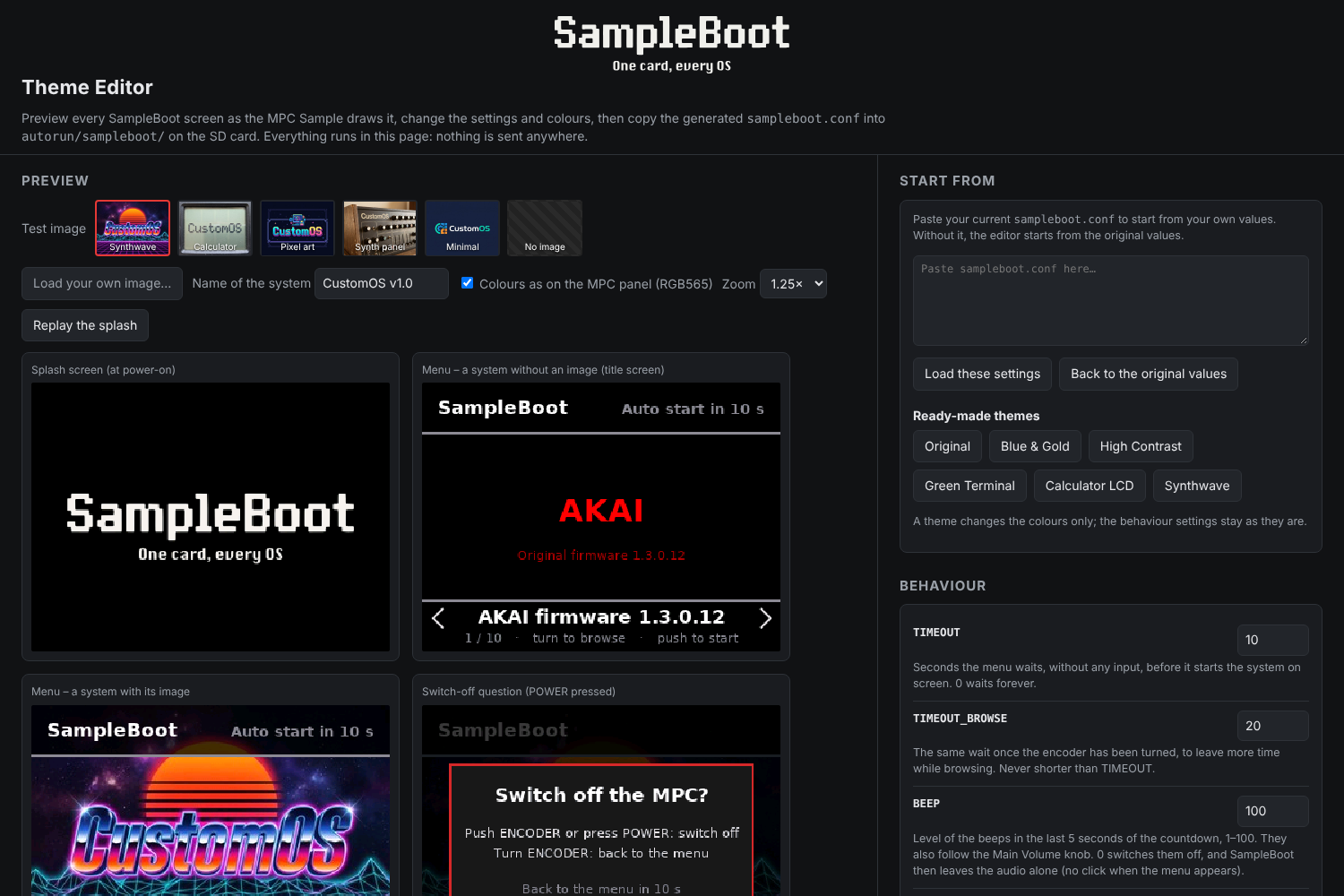
tools/theme-editor.html is a single page that works offline, in any browser,
and sends nothing anywhere:
- previews every SampleBoot screen exactly as the MPC draws it, over test images or an image of your own, and plays the splash screen;
- has a colour picker and a short explanation for every setting, and ready-made themes;
- reads your current
sampleboot.conf(paste it in) and writes the whole new file, ready to copy or download.
Known behaviour
- Small clicks with the volume up. The stock firmware itself clicks after
the start-up animation and when the SD card screen closes, with or without
SampleBoot. When SampleBoot's menu appears, opening the audio for the
countdown beeps can click slightly. It is kept as small as possible but not
fully avoidable. With
BEEP=0SampleBoot leaves the audio alone and that click is gone, together with the beeps. - Melodee's on-device updater (release zip on the card, B3 INSTALL) refuses
to update while SampleBoot is installed, without changing anything. Replace
Melodee's folder in
autorun/mods/instead.
Troubleshooting
- Read
autorun/sampleboot/last-boot.logon the card: it describes the last boot.boot-history.log, next to it, has the boots before, oldest first. - If the MPC hangs, hold POWER until it switches off, remove the card and
rename its
autorunfolder toautorun-off. The MPC then starts as stock. - Folder names may contain spaces. If an OS does not start from such a folder,
rename the folder without spaces and put the name in
sampleboot.txt. - To report a problem, open an issue and attach
last-boot.log.
Build from source and technical notes
How SampleBoot works on the device, the files it uses and how to build it: docs/TECHNICAL.md.
Credits and licence
SampleBoot is by Alessandro "Paxi" D'Esposito (pxcm), under the MIT licence.
- The control surface map, the display and audio details and the autorun signature come from the research published by sample-base (keremimo, the author of Melodee) and the mpc-sample-plugins project. Thank you.
- Melodee, SampQOL OS and MPC Simple belong to their authors. SampleBoot ships none of their files.
- stb_image by Sean Barrett (public domain / MIT).
- DejaVu Sans font (DejaVu fonts licence).
- The "CustomOS" test images are made-up logos generated with Magnific.
- SampleBoot logo by Alessandro "Paxi" D'Esposito.
SampleBoot is an independent project, not affiliated with or endorsed by inMusic Brands or Akai Professional. Akai Professional, MPC and MPC Sample are trademarks of inMusic Brands, Inc., used here only to say which device SampleBoot is made for.
Recent releases
-
Release notes
One card, every OS: a boot selector for the Akai MPC Sample. Website: https://sampleboot.com
Added
sampleboot.inplace. An empty file with this name in a system's folder makes SampleBoot run it fromautorun/itself, as if it were alone on the card. For systems that take "the folder above their own" for the card. MPCTRACKER 0.1.0 needs it: without it, its file browser stays insideautorun/mods/and it looks for its songs and samples there.- Boot history.
autorun/sampleboot/boot-history.logkeeps the logs of the last 10 boots, each headed by its date, to compare tests.BOOT_HISTORYinsampleboot.confsets how many (0 = none). - Notes for OS authors: how to make a system that runs from SampleBoot exactly as it runs on its own.
Fixed
- The last line of
last-boot.logcould be missing when the card was read from a computer through SD card access without a restart. It is now written to the card at once.
Works with
Firmware 1.3.0 (1.3.0.12) with SampQOL OS 0.1.4.7 to 0.3.0, Melodee 0.1.0 to 0.3.0, MPC Simple 1.0 Beta 1 to Beta 3 and MPCTRACKER 0.1.0 (tested), ODDFORM 1.2.0 beta (reported by a user). See the list.
Updating
Copy the
autorunfolder from the zip over the one on your card (your systems inautorun/mods/stay), or runtools/add_mod.pywith your card's path to keep your settings too. Asampleboot.conffrom 1.0.x works as it is. -
Release notes
One card, every OS: a boot selector for the Akai MPC Sample.
Fixed
- SampQOL OS 0.3.0's 16 USB audio outputs now work when SampQOL is started from SampleBoot. SampQOL keeps its settings in
mpcqol.confat the card root, but its start script reads them from the folder above its own, which under SampleBoot isautorun/mods/. SampleBoot now shows the card root'smpcqol.confinautorun/mods/too (a bind mount of that one file, until power-off), so SampQOL reads its real settings. The first time, a copy of the file is left inautorun/mods/: that's expected.
Added
ROOT_FILESsetting insampleboot.conf: the settings files to show inautorun/mods/this way. Default"mpcqol.conf".
Tested
Firmware 1.3.0 (1.3.0.12) with Melodee 0.1.0 to 0.3.0, SampQOL OS 0.1.4.7 to 0.3.0 and MPC Simple 1.0 Beta 1 and Beta 2.
Updating from 1.0.0
Copy the
autorunfolder from the zip over the one on your card (your systems inautorun/mods/stay), or runtools/add_mod.pywith your card's path to keep your settings. Asampleboot.conffrom 1.0.0 works as it is: the default applies.Thanks to the user who reported the missing USB outputs!
- SampQOL OS 0.3.0's 16 USB audio outputs now work when SampQOL is started from SampleBoot. SampQOL keeps its settings in
-
Release notes
One card, every OS. SampleBoot is a boot menu for the Akai MPC Sample: the stock firmware and every custom OS (Melodee, SampQOL OS, MPC Simple, …), in as many versions as you like, live on the same SD card. Turn the encoder, push it, and the system you chose starts. No more swapping cards or moving
autorunfolders around.Tested on firmware 1.3.0 (1.3.0.12). SampleBoot changes nothing on the MPC: without the card, it starts as stock. Back up your SD card before installing.
Install
- Download
SampleBoot-1.0.0.zipbelow and unzip it. - Copy its
autorunfolder to the top level of the SD card. - Copy each OS's own
autorunfolder intoautorun/mods/and rename it, e.g.autorun/mods/Melodee 0.2.2/.
Full instructions in the README.
In this release
- Splash screen drawn line by line (dark, light, your own or off), then a full-screen boot menu with each system's image, encoder control, countdown with beeps that follow the Main Volume knob, switch-off from POWER
- Switches off the pad and button lights left on by the previous app
- Add an OS by copying a folder; several versions side by side; custom name and image per system
- Falls back to the stock app if a system does not start; restores every audio setting it touches
- Every colour configurable in
sampleboot.conf, plustools/theme-editor.html, an offline page that previews every screen exactly as the MPC draws it tools/add_mod.py, an optional helper that adds OSes straight from their release zips
See CHANGELOG.md for everything.
SampleBoot ships no custom OS: download them from their own projects. Not affiliated with inMusic Brands or Akai Professional.
- Download